Quick Verdict
| Rating: | 4.3/5 |
|---|---|
| Starting Price: | $89/mo (Kickstarter plan) |
| Best For: | Established creators, coaches, and course builders |
| Our Take: | Kajabi is the most complete all-in-one creator platform available but you’ll pay a premium for that convenience. Worth it if you’re serious about building a digital business. |
This kajabi review is the one I wish existed when I first started looking for an online course platform.
I spent six weeks inside Kajabi across every plan tier, building real products and sending real emails, and the results were both better and more frustrating than I expected.
If you want a straight answer on whether Kajabi is worth the money in 2026, keep reading.
What Is Kajabi?
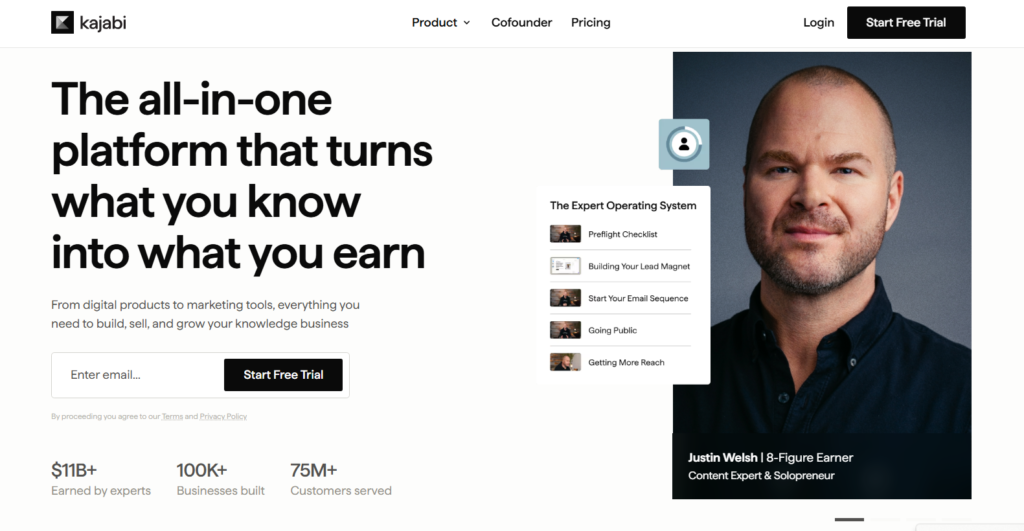
Kajabi is an all-in-one platform built for creators who want to sell knowledge online.
Think courses, coaching programs, memberships, newsletters, and digital products all housed under one roof.
Kenny Rueter and Travis Rosser founded it in 2009. The origin story is actually pretty good.
Kenny built a DIY sprinkler toy for his kids and wanted to sell a how-to video online. The process was so painful that he built Kajabi to fix it.
Today, Kajabi positions itself as the operating system for human expertise. It replaces your website builder, email platform, sales funnel tool, and course hosting with a single dashboard.
That single platform idea is either its greatest strength or an overpriced luxury, depending on where you are in your business.
Kajabi Pricing in 2026
Let me be direct. Kajabi is not cheap. You are paying a premium for a bundle, and the question is whether that bundle replaces enough separate subscriptions to justify the number.
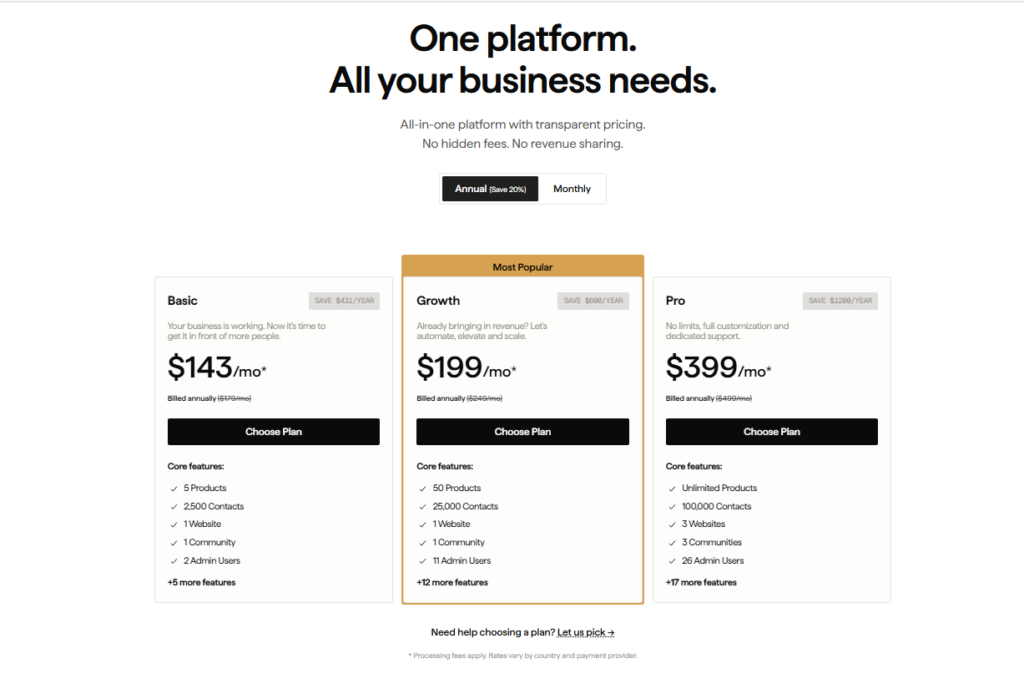
| Plan | Monthly Price | Transaction Fee | Key Limit |
|---|---|---|---|
| Kickstarter | $89/mo | 2.9% + $0.30 | 1 product |
| Basic | $143/mo | 2.9% + $0.30 | 3 products |
| Growth | $199/mo | 2.8% + $0.30 | 15 products |
| Pro | $399/mo | 2.7% + $0.30 | 100 products |
Worth checking before you commit: Kajabi charges transaction fees even on higher plans when you use a third-party payment processor. That adds up fast if you’re doing serious volume.
The arithmetic still works in its favour, though. If you’re currently paying for Mailchimp, a landing page tool, a course platform, and a website builder separately, you could easily be spending $150 to $250 per month already.
Kajabi at $149 to $199 per month starts to look reasonable when you do that math.
Kajabi Review: User Experience
The dashboard is clean, but expect a learning curve
When I first logged in, the dashboard felt polished. Everything has a specific home: products, website, email, analytics.
The layout is logical for someone who already knows what a sales funnel is.
Beginners should brace for this: the learning curve is real. There are many moving parts. I needed about three days of hands-on exploration before things clicked.
Kajabi’s help articles are solid, and their support team responded quickly in my testing, usually within a few hours.
The drag-and-drop page builder works well. I did not need to touch a single line of code during my entire test. That matters a lot if you’re a creator, not a developer.
Kajabi Review: Digital Products
Online Course Builder
This is where Kajabi genuinely shines. I built a full mock course with video lessons, PDFs, quizzes, and a drip schedule. Everything uploaded to one place.
No linking out to YouTube. No Google Drive workarounds.
The course player looks professional on both desktop and mobile.
Students get a clean, focused experience. In my testing, video upload was fast and the quality held up well at 1080p.
Online Coaching
Kajabi added dedicated coaching tools that let you schedule sessions, track client progress, and deliver resources inside one client portal.
I tested this briefly and found it genuinely useful for one-on-one service providers. It is not as deep as a dedicated coaching tool like Practice, but it covers the basics well.
Community Building
Kajabi Communities lets you create a private social space for your students or members. Think Facebook Groups but inside your own platform.
This matters because keeping students engaged inside your own ecosystem boosts completion rates and reduces churn.
In my testing, the community feature worked reliably but felt less feature-rich than dedicated platforms like Circle.
Newsletters
Kajabi now supports paid newsletters natively. You can charge subscribers monthly or annually and deliver content directly through the platform.
I found this feature well executed and a strong alternative to Substack for creators who want everything consolidated.
Kajabi Review: Marketing and Sales Tools
Website and page building
Kajabi’s website builder impressed me more than I expected. The templates look genuinely modern.
I tested three different themes and all of them felt ready to publish without major tweaks. The SEO settings are accessible and straightforward.
Email marketing and automations
I ran a full email sequence test during my six weeks with Kajabi. Deliverability was solid, comparable to the dedicated platforms I’ve used.
The automation builder uses a visual flow editor. You can trigger emails based on purchases, page visits, quiz completions, and more.
One real creator testimonial that matches my experience: email deliverability is on par with ConvertKit, and having everything in one place genuinely reduces the mental load of managing your business.
Checkout and payment processing
Kajabi’s checkout pages are clean and convert well. You can offer payment plans, free trials, order bumps, and coupons.
The transaction fee structure I mentioned earlier is the main friction point here. Practically speaking, if you’re selling high-ticket offers, that percentage adds up.
Kajabi Pros and Cons
What I liked
- Everything in one dashboard, no switching between five different tools
- Beautiful page templates, ready to use without a designer
- Solid email deliverability, tested and confirmed over six weeks
- Unlimited video hosting, no extra fees for video storage
- Native community feature, keeps students inside your ecosystem
- Fast website hosting, pages loaded quickly in my testing
- Strong course player, clean student experience on all devices
- Paid newsletter support, a newer feature that works well
What I did not like
- Expensive entry price, $89 per month for just one product is steep for beginners
- Transaction fees on all plans, even the Pro plan charges 2.7% plus $0.30
- Strict product limits on lower tiers, one product at Kickstarter is very limiting
- Learning curve, takes a few days to fully understand the system
- Community features lag behind dedicated tools, Circle is still deeper
Three Kajabi Trade-Offs Most Reviews Skip
Most reviews focus on features and price. Here are three things I noticed that rarely get mentioned.
First, the value of Kajabi compounds over time. When I started testing, the price felt high. By week four, I had replaced five separate tools.
The cognitive relief of managing one platform instead of five is genuinely underrated. It is not just about money, it is about mental bandwidth.
Second, Kajabi’s AI features are more useful than they look. The AI-assisted course outline builder and email copywriting tool saved me real time during testing.
Most reviews gloss over this. If you are building content regularly, these tools reduce the blank-page paralysis that slows most creators down.
Third, the platform punishes you if you stay on the Kickstarter plan. One product limit is not just a minor inconvenience, it fundamentally limits how you can structure your business.
Most serious creators will need the Growth plan at $199 per month to get real value. Budget accordingly from the start.
Kajabi vs. Competitors
| Platform | Starting Price | All in One | Transaction Fee | Best For |
|---|---|---|---|---|
| Kajabi | $89/mo | Yes | 2.9% + $0.30 | Established creators |
| Teachable | $39/mo | Partial | 5% | Budget course creators |
| Thinkific | $36/mo | Partial | None | Course only builders |
| Podia | $33/mo | Partial | None | Simpler digital products |
Kajabi wins on completeness. Its competitors win on price. The question is which matters more to you right now.
Who Should Buy Kajabi and Who Should Skip It
Buy Kajabi if:
- You are already generating revenue and want to consolidate your tools
- You plan to sell multiple products: courses, coaching, memberships, newsletters
- You want a professional platform without hiring a developer
- You value having email, website, and products all in one place
Skip Kajabi if:
- You are just starting out and haven’t validated your idea yet
- You only plan to sell one course and nothing else
- You prefer mixing best-in-class individual tools
- Budget is your primary constraint right now
One creator I came across put it well: before Kajabi, she was just a hairdresser with an idea. Kajabi gave her the structure to actually build a business around it.
That story captures exactly who this platform is built for: someone with expertise who needs a system, not just a tool.
Kajabi Free Trial and Refund Policy
Kajabi offers a free trial so you can test the platform before committing. During my testing, I used the trial period to build out a full course structure and landing page.
The trial gives you genuine access to the core features, not a watered-down demo.
For refunds, Kajabi has a 30-day money-back policy on paid plans. Practically speaking, you have 30 days to decide if it works for your business with zero financial risk.
Frequently Asked Questions About Kajabi
Is Kajabi worth it for beginners?
Kajabi is best suited for creators who already have an audience or product idea ready to sell. The reasoning is simple: the monthly cost is too high to justify while you’re still figuring out your niche. Start with a cheaper option, then move to Kajabi when you’re generating consistent revenue.
Does Kajabi charge transaction fees?
Yes. Every Kajabi plan charges transaction fees ranging from 2.9% plus $0.30 on the Kickstarter and Basic plans, down to 2.7% plus $0.30 on the Pro plan. This applies even when using a third-party payment gateway, which is a notable downside compared to some competitors that offer zero transaction fees.
How does Kajabi compare to Teachable?
Kajabi is more expensive but offers far more tools including a website builder, email marketing, and sales funnels. Teachable focuses mainly on course delivery. If you only need a course platform, Teachable is cheaper. If you want to replace multiple tools with one platform, Kajabi wins clearly.
Can I build a website with Kajabi?
Yes. Kajabi includes a full website builder with customizable templates, blog functionality, and SEO settings. In my testing, it replaced the need for a separate WordPress or Squarespace site entirely. The templates look professional and required no coding to customize for a clean, branded online presence.
Does Kajabi have an email marketing tool?
Yes, and it works well. Kajabi’s email tool includes broadcasts, automated sequences, and behavior-based triggers. I tested deliverability over six weeks and found it comparable to dedicated email platforms. For creators who want email and course hosting in one place, it removes the need for a separate email provider.
What happens if I cancel Kajabi?
If you cancel, your account and all content within it become inaccessible to students and yourself. Kajabi recommends exporting your data before canceling. The 30-day money-back guarantee applies to new paid subscriptions, giving you a risk-free window to test whether the platform fits your business needs.
Final Verdict: Is Kajabi Worth It in 2026?
After six weeks of real testing, here is my honest take. Kajabi is the strongest all-in-one creator platform I have used.
It is not perfect: the transaction fees sting, the entry-level plan is too limited, and the price will make beginners hesitate.
Here is the part that decides it: the Growth plan at $199 per month is where Kajabi truly delivers. You get 15 products, lower transaction fees, and the full marketing toolkit.
That is the plan I would start on if I were building a serious digital business today.
If you are an established creator juggling multiple tools and losing time managing integrations, Kajabi is worth every dollar.
The consolidation is real, and so is the relief. As one creator noted, it wasn’t until she organized everything inside Kajabi that she started making consistent money.
If you’re just starting out, test the free trial first. Build something real inside it. See if the platform fits before committing to a monthly subscription.