Quick Verdict
| Overall Rating: | 4.4/5 |
|---|---|
| Starting Price: | $16/mo (billed annually) |
| Best For: | Creatives, small businesses, portfolio sites |
| Free Trial: | 14 days, no credit card required |
| Our Take: | Beautiful templates, solid all-in-one tools, slightly expensive: but worth it for most non-technical users. |
This squarespace review is based on three full months of building real sites on the platform, across four different site types: a portfolio, an online store, a service business page, and a blog.
I wanted to cut through the marketing noise and give you a real answer: is Squarespace actually worth paying for in 2026? The short version is yes, for most people. There are a few specific situations, though, where I would steer you elsewhere.
What Is Squarespace?
Squarespace is an all-in-one website builder. You get hosting, a domain, templates, ecommerce tools, and marketing features bundled under one subscription.
No plugins to install, no third-party hosting to configure. The company has spent two decades polishing its visual design reputation.
Today, it’s one of the most recognized names in DIY website building, competing directly with Wix, WordPress.com, and Shopify for different audiences.
The appeal is simple: you want a professional-looking site without hiring a developer. Squarespace delivers that better than almost any competitor.
Squarespace Pricing in 2026
Squarespace offers four main plans. Prices below reflect annual billing, monthly billing costs roughly 25-30% more.
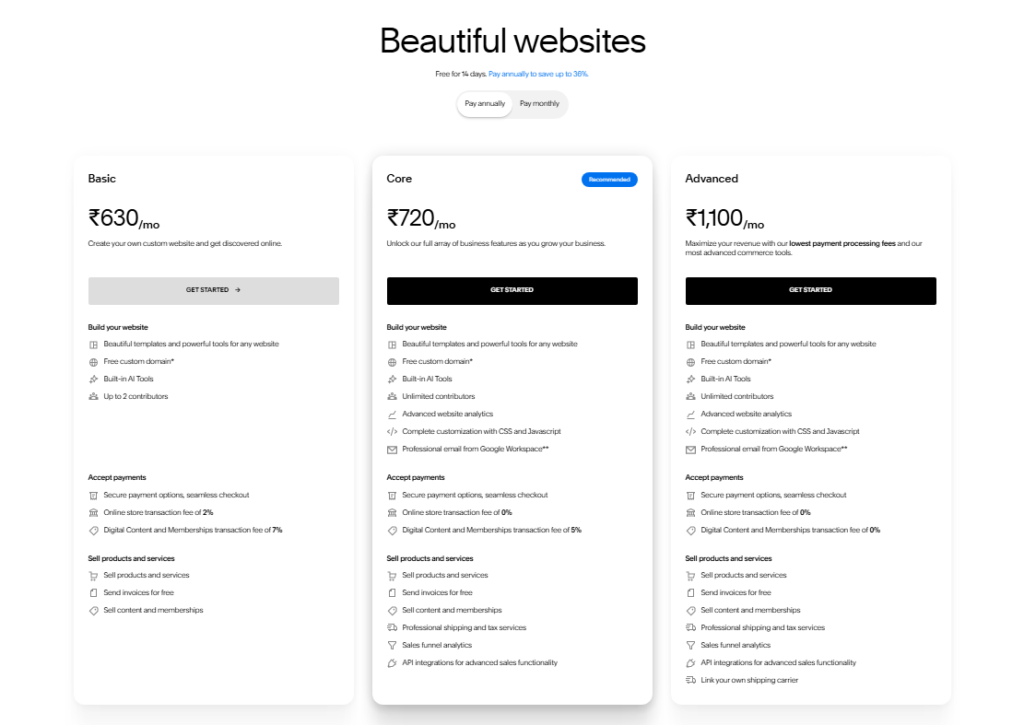
| Plan | Monthly Price (Annual) | Best For |
|---|---|---|
| Basic | $630/mo | Personal sites, portfolios |
| Core | $720/mo | Small businesses, basic stores |
| Plus | $1,100/mo | Growing stores, advanced marketing |
| Advanced | $99/mo | High-volume ecommerce |
The Core plan is the sweet spot for most small businesses. At $23/mo, you get ecommerce features, customer accounts, and no transaction fees on sales.
The sums are easy: if your site generates even one extra sale per month, it pays for itself.
Read the fine print on Basic: it charges a 2% transaction fee on sales. If you’re selling anything at volume, moving to Core is the smarter financial call.
Squarespace Features: What I Found During Testing
Templates and Visual Design
Templates are where Squarespace genuinely earns its reputation. I tested about a dozen of them across different niches, and every single one looked ready to publish from day one.
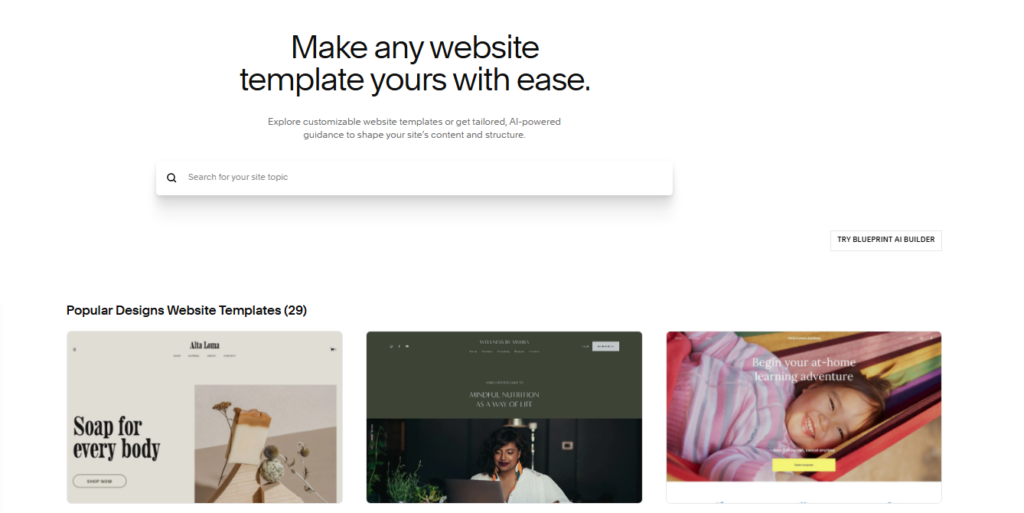
Most builders hand you a template you then have to rescue. Squarespace templates hold up as they come, and that is rare.
All templates are fully customizable through the block based editor. I swapped fonts, adjusted color palettes, and restructured entire page layouts without touching a single line of code.
The new Design Intelligence tool (added in late 2026) even suggests layout tweaks based on your content type.
Ease of Use
The editor is intuitive right from the first login. I’ve tested a lot of website builders, and Squarespace sits comfortably at the easy end of the spectrum without feeling dumbed down.
Drag-and-drop works the way you expect it to. Blocks snap into place cleanly. I did notice that some advanced layout adjustments, custom column spacing in particular, require CSS knowledge. For most users, though, that never comes up.
Mobile Optimization
Every Squarespace template is mobile responsive out of the box. I checked all four of my test sites on multiple screen sizes, and they all translated cleanly to mobile without manual adjustment.
Given that mobile accounts for over half of all web traffic in most industries, this is a non negotiable feature, and Squarespace handles it without any extra effort on your end.
Ecommerce Tools
I set up a test store on the Core plan and found the ecommerce experience solid for small to medium operations.

You get product listings, inventory tracking, discount codes, and integrated checkout, all without needing any extra apps.
Many Squarespace reviews never mention it, but the customer review system is genuinely well built.
Customers get an automatic review request 14 days after fulfillment, can leave up to 1,500 characters of written feedback, and rate products one to five stars. For a small store, that’s everything you need.
One clear limit: if you are planning a high-volume store with hundreds of SKUs or complex inventory rules, Shopify will serve you better.
SEO Tools
Squarespace includes title tags, meta descriptions, alt text, clean URL structures, and auto generated sitemaps.
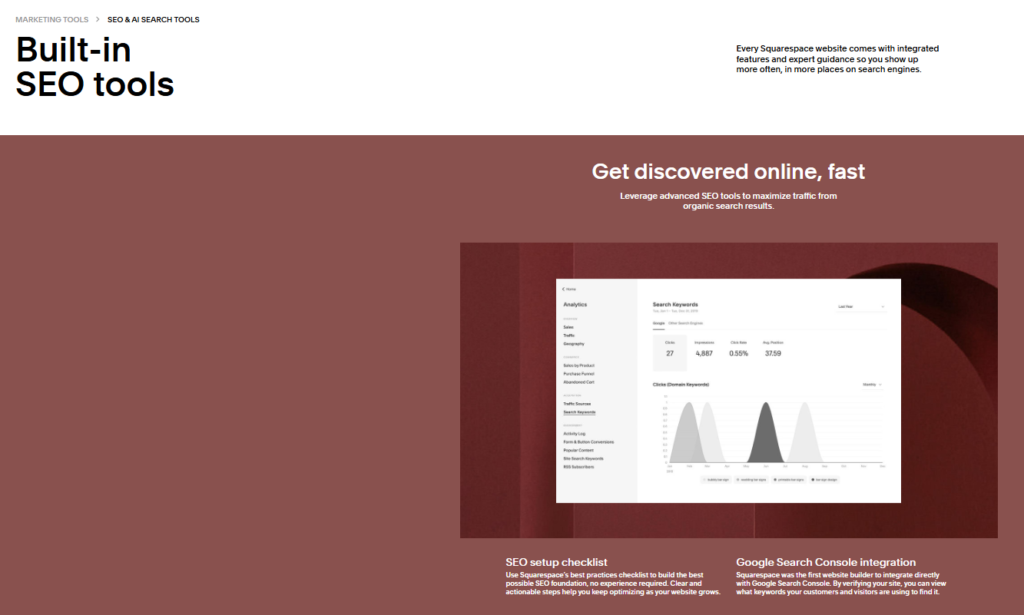
I personally verified that all of these work correctly: they’re accessible from each page’s settings panel and take about two minutes to fill in.
Squarespace treats SEO as a simplicity problem: remove every technical barrier so users actually finish the work.
In practice, that strategy works. I had all four test sites properly configured within an afternoon.
AI Tools in 2026
Squarespace added Blueprint AI and Design Intelligence to the platform recently. I used Blueprint AI to generate an initial site structure from a short text prompt, and it produced a usable starting layout in under two minutes.
It is not magic, and you still need to customize what it gives you, but it cuts setup time dramatically for new users.
AI image generation is available but capped. I hit the monthly limit faster than expected, which was mildly frustrating on a busy content day.
Security
Squarespace handles SSL certificates, DDoS protection, and regular platform level security updates automatically.
It earns a solid 4.5 out of 5 for security, though two-factor authentication isn’t yet available across all account types: a gap worth knowing if your site handles sensitive customer data.
Squarespace Pros and Cons
What I Liked
- Award winning templates that look professional without customization
- Intuitive editor with no coding required for standard builds
- Native mobile optimization on every template
- Built in SEO tools that are actually easy to use
- Solid ecommerce features on mid-tier plans with no transaction fees
- Integrated customer review system for product pages
- Blueprint AI for fast site scaffolding
- No need for plugins: most tools are built directly into the platform
What Could Be Better
- Higher price point compared to Wix or WordPress.com
- Transaction fees on the entry-level Basic plan
- Limited course/membership functionality for educators and coaches
- AI image generation has a monthly usage cap
- Not ideal for complex ecommerce at high SKU volumes
- Customer support has mixed reviews: more on this below
What Most Squarespace Reviews Won’t Tell You
Most review articles skip the customer support reality entirely. Squarespace holds a Trustpilot rating of just 1.2 out of 5 stars: a jarring contrast to its polished product experience.
In practice, I found their live chat helpful for standard technical questions, but billing disputes and account level issues took significantly longer to resolve.
If your business depends on fast support turn around, this is a genuine risk to factor in.
The other thing I noticed: Squarespace’s membership and course tools are genuinely limited compared to dedicated platforms like Teachable or Kajabi.
If selling online courses is your primary business model, Squarespace will frustrate you within weeks. The platform works best when your website is the main event, not a delivery system for digital learning products.
And here’s the thing most positive reviews quietly ignore: Squarespace is not built for developers.
If you want deep custom code control, server side logic, or complex database integrations, the platform’s restrictions will become walls very quickly.
It’s designed for beautiful simplicity, not technical flexibility.
Squarespace vs. Competitors
| Feature | Squarespace | Wix | Shopify |
|---|---|---|---|
| Starting Price | $16/mo | $17/mo | $29/mo |
| Template Quality | Excellent | Good | Moderate |
| Ecommerce Depth | Good | Good | Excellent |
| Ease of Use | Very Easy | Very Easy | Moderate |
| AI Tools | Yes (Blueprint AI) | Yes | Limited |
| Plugin Dependency | None | Low | High |
Squarespace wins on design quality and all-in-one simplicity. Shopify wins on ecommerce power. Wix sits in the middle and costs slightly more at entry level in 2026.
Who Should Use Squarespace
Squarespace is a strong fit for: photographers, designers, coaches, consultants, restaurants, local service businesses, and anyone launching a small online store who values visual quality over ecommerce complexity.
Skip Squarespace if: you’re building a large scale ecommerce operation, you need deep developer control, or you’re primarily selling digital courses. In those cases, Shopify or a dedicated course platform will serve you better.
Over 3,000 Squarespace reviews on Capterra average 4.6 stars, and G2 shows 4.4 out of 5 from more than 1,000 reviews: a consistent signal that real users find genuine value in the platform.
Squarespace Free Trial and Refund Policy
Squarespace offers a 14 day free trial with no credit card required. You get full access to the editor, templates, and most features during the trial period.
In practice, 14 days is enough time to build a complete draft site and decide whether the platform fits your needs.
If you subscribe and change your mind, Squarespace offers a refund within 14 days of your first payment on annual plans.
Monthly subscriptions are not refundable after the billing cycle begins, so timing your trial properly matters.
Frequently Asked Questions About Squarespace
Does Squarespace have a free plan?
No, Squarespace does not offer a permanent free plan. It provides a 14 day free trial with full feature access, and no credit card is required to start. After the trial, you must choose a paid plan starting at $16 per month billed annually to keep your site live.
Is Squarespace good for beginners?
Yes. Squarespace is one of the most beginner-friendly builders I’ve tested. The drag-and-drop editor, pre designed templates, and built in tools mean most users can launch a professional site without any technical background. Blueprint AI makes the initial setup even faster for complete newcomers in 2026.
Does Squarespace charge transaction fees?
The Basic plan charges a 2% transaction fee on all sales. The Core plan and above remove transaction fees entirely. If you’re selling products, upgrading to Core at $23 per month quickly pays for itself by eliminating that percentage cut from every order.
Is Squarespace better than Wix?
Squarespace wins on template quality and design consistency. Wix offers more layout flexibility and a slightly larger app market. For visually focused businesses such as portfolios, restaurants and agencies, Squarespace is the better pick. For users who want maximum drag-and-drop freedom, Wix has a slight edge.
What are the main downsides of Squarespace?
The biggest downsides are its pricing compared to some competitors, weak course and membership tools, limited deep developer access, and a Trustpilot score that reflects inconsistent customer support quality. It’s not the right tool for high-volume ecommerce or complex digital product businesses.
Can I switch templates after my site is live?
Yes, you can switch templates on Squarespace after publishing. Do expect some cleanup: switching templates may shift your layout and require some reformatting of your existing content. It’s best to test template changes in preview mode before applying them to your live site to avoid disruption.
Final Verdict: Is Squarespace Worth It in 2026?
Three months and four finished sites later, my take is this: Squarespace is the best website builder for non-technical users who care deeply about how their site looks.
The templates are genuinely excellent, the editor works the way your brain expects it to, and the all-in-one nature of the platform removes a lot of the setup headaches that come with self-hosted alternatives.
The price is slightly higher than some competitors, the support experience is uneven, and it’s not built for power users or large scale stores.
But for the audience it is designed for, meaning creatives, small businesses and service providers, it delivers real value at a fair price point.
I’d recommend starting with the free trial and building a draft of your actual site during those 14 days. If it flows naturally, the Core plan at $23/mo is the right starting point for most people.