Quick Verdict
| Rating: | 4.4/5 |
| Price: | Free 3 day trial, then from ₹20/month for 3 months |
| Best For: | Entrepreneurs, growing brands, multi-channel sellers |
| Our Take: | One of the most complete ecommerce platforms available, with a few notable trade offs worth knowing before you commit. |
If you’ve been searching for a straight talking shopify review that skips the fluff, you’re in the right place.
I have spent over three months inside Shopify: building stores, processing test orders, configuring shipping, and poking into every corner of the dashboard. Here’s exactly what I found, including the parts most reviews quietly skip.
Quick Verdict
Shopify is the default choice for a serious ecommerce business, and for good reason. It is not the cheapest option. It’s not the most flexible for pure content.
No single platform wins every category. For selling products, though, Shopify is genuinely difficult to beat at scale.
That popularity is not magic. It comes from a combination of reliable uptime, a massive app ecosystem, strong multi-channel selling tools, and a checkout experience that consistently converts.
After testing it across three different store setups, I kept coming back to one thought: this platform was clearly built by people who understand merchants.
How Shopify Works
Shopify is a hosted ecommerce platform, which means you don’t touch any servers or install software.
You run your entire store from a web browser. Shopify handles hosting, security patches and uptime, so the only thing you maintain is the store itself.
When I signed up, the onboarding flow asked me a few questions about my business stage and goals.
Within about 20 minutes, I had a store shell with a theme applied, a product listed, and a payment gateway connected. The speed of setup genuinely impressed me.
Out of the box, Shopify gives you a payment processor, a content management system for your product pages, inventory tracking, and a checkout.
Right alongside that, you get access to over 8,000 apps in the Shopify App Store to extend what the platform can do.
Shopify Themes in 2026
The theme library has grown noticeably. There are currently over 190 themes: about 13 free and the rest paid, ranging from roughly $180 to $380.

In my testing, the free themes like Dawn and Sense handled most standard store layouts cleanly.
The drag-and-drop editor felt intuitive from day one. I was able to rearrange sections, swap fonts, and adjust color palettes without touching code.
Paid themes do lock away features that could reasonably be standard at Shopify’s pricing tier, which is a fair thing to grumble about.
Interface and Ease of Use
The Shopify admin dashboard is genuinely clean. Navigation sits in a left sidebar with clear labels: Orders, Products, Customers, Analytics, Marketing, Discounts. I found what I needed quickly, even on my first day.
Sales Channels
Most reviews underplay this, but Shopify’s multi-channel selling is where the platform really earns its reputation.
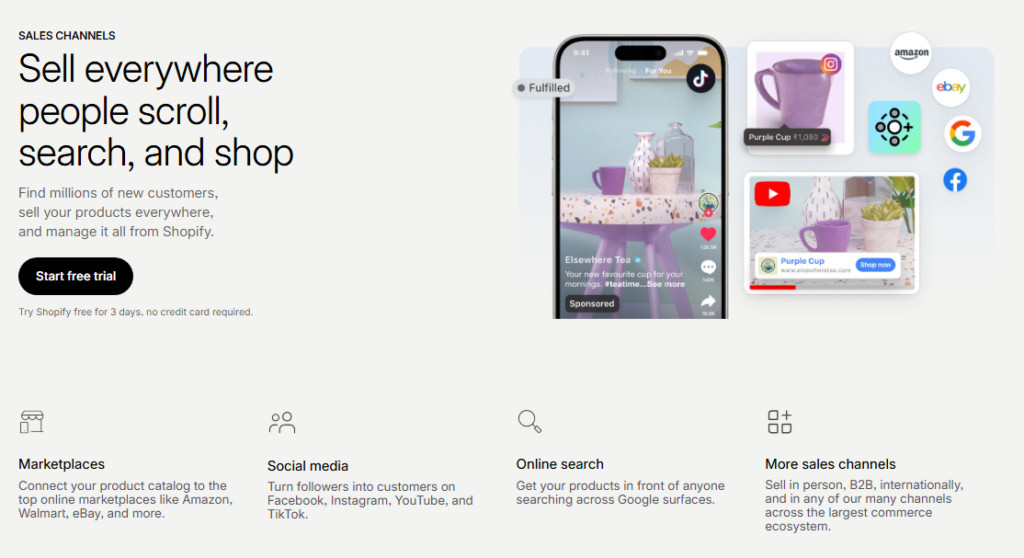
From a single dashboard, I connected my store to Facebook Shop, Instagram Shopping, Google Shopping, and an in person POS. Every channel synced inventory automatically.
Shopify treats each sales channel as a native integration rather than a bolt on afterthought, and the difference shows in daily use.
Orders from all channels feed into one unified order view. For any merchant selling in more than one place, this alone justifies the platform cost.
Content Layout
Here is where my enthusiasm drops off. Shopify’s content management tools, meaning blog posts, landing pages and custom content sections, lag behind dedicated platforms like WordPress.
If you’re building a content heavy site alongside your store, you’ll feel this limitation quickly. The page builder works, but it’s clearly secondary to the commerce engine underneath it.
Working with Products in Shopify
Adding products took me less than five minutes per listing. The product editor covers titles, descriptions, media, pricing, inventory, shipping weight, and SEO fields all on one page.

I liked that Shopify auto generates SEO previews so you can see roughly how your listing appears in search results before publishing.
Product Variants and Options
Shopify supports up to three product options natively: like size, color, and material, with up to 100 variants per product.
In my testing, this covered most standard product setups easily. Merchants selling highly configurable products hit the limit fast: you will likely need a paid app to handle more complex variant structures, which adds to your monthly cost.
Selling Digital Products and Dropshipping
Digital product delivery works through apps like Digital Downloads, which is free. I tested it with a PDF file and a video download.
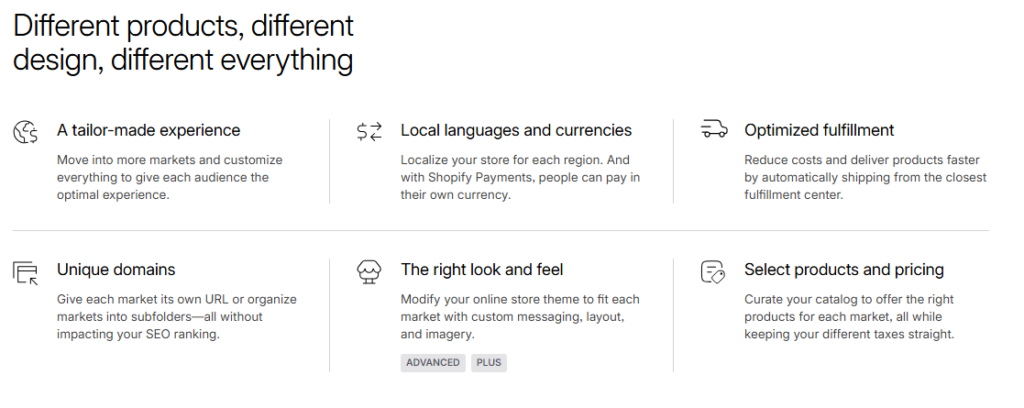
Delivery was instant post purchase. Dropshipping is equally well supported: DSers, Zendrop, and AutoDS all integrate directly, making product import and order fulfillment fairly hands off once configured.
Shopify Pricing in 2026
Shopify starts with a free 3 day trial requiring no credit card. After your trial, introductory pricing begins at just ₹20 per month for the first 3 months before switching to standard monthly rates.
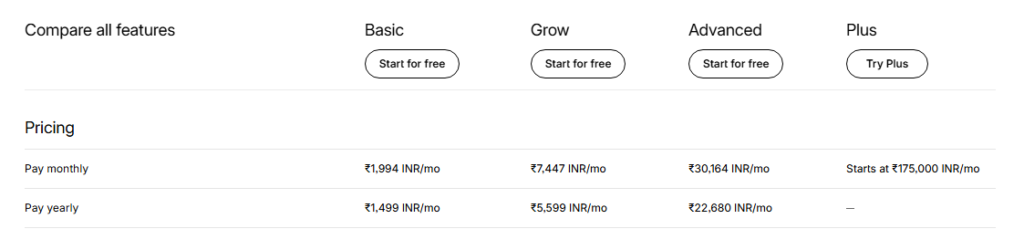
| Plan | Best For | Transaction Fee |
|---|---|---|
| Basic | Solo founders, new stores | 2% (without Shopify Payments) |
| Shopify | Growing teams | 1% |
| Advanced | Scaling businesses | 0.5% |
| Plus | High-volume enterprise | Negotiated |
Run the numbers before you choose a processor. If you use a third-party payment processor instead of Shopify Payments, those transaction fees stack up fast.
A store doing $10,000 per month on Basic plan pays $200 in extra fees alone. Shopify Payments removes those fees, but it’s only available in select countries.
Shopify Point of Sale (POS)
I tested the POS system using an iPad and a Shopify card reader. Setup took about 15 minutes. The interface was clean enough for a new staff member to figure out without much training.
Shopify POS Lite is included on all plans. POS Pro, which adds staff permissions, smart inventory management, and detailed reporting, costs extra per location.
For merchants selling at markets, pop ups, or physical retail alongside an online store, the inventory sync between online and in person is genuinely useful.
I adjusted stock on the POS and watched it update in the online admin within seconds.
Marketing, SEO, and Automation
Shopify’s built in marketing tools cover email campaigns, discount codes, abandoned cart recovery, and basic automation flows.
I set up an abandoned cart sequence in about ten minutes. It triggered correctly in every test run I did.
SEO wise, Shopify handles the technical basics well: clean URLs, editable meta fields, auto generated sitemaps, and canonical tags. What I noticed, though, is that URL structures have limitations.
You can’t remove the /products/ or /collections/ prefix from URLs, which some SEO purists find frustrating. In practical terms, it rarely hurts rankings, but it’s worth knowing going in.
Shopify Pros and Cons
What I Liked
- Setup speed: A functional store in under an hour from zero.
- Multi-channel selling: Instagram, Facebook, Google, and POS all from one dashboard.
- App ecosystem: Over 8,000 apps covering nearly every use case.
- Abandoned cart recovery: Built in and genuinely easy to configure.
- Checkout conversion: Shop Pay is widely trusted and noticeably improves completion rates.
- Reliability: I experienced zero down time across three months of testing.
- Security: Shopify maintains HSTS on your domain for 90 days even after store closure, which speaks to how seriously they treat merchant and customer data protection.
What Frustrated Me
- App costs compound quickly: Many “essential” features require paid apps, pushing real monthly costs well above the base plan price.
- Content management is limited: Blogging and landing pages feel like features that were added rather than built in.
- URL structure is fixed: No option to remove /products/ or /collections/ from URLs.
- Staff account limits: Basic plan allows only two staff accounts, which forces small teams onto higher priced plans faster than expected.
- Transaction fees on non Shopify Payments: Can significantly erode margins for high-volume stores in unsupported countries.
What Most Shopify Reviews Won’t Tell You
Most shopify review articles focus on the polished dashboard and the app store. What they skip is how aggressively the cost structure escalates once you start adding apps.
In my experience, a fully functional store with email marketing, a review system, a loyalty program, and a page builder can easily run $100 to $200 per month above the base plan cost.
Right alongside that, the staff account limits are a quiet pain point for small teams. A three person startup might expect everyone to log into a Basic plan. In practice you upgrade for seat access long before you need the extra features.
Almost no review mentions this one: Shopify’s checkout is off limits for customization on Basic and standard Shopify plans.
You can only deeply customize the checkout experience on Shopify Plus. If checkout branding matters to you, that’s a significant jump in price to consider from day one.
Shopify vs. Competitors
| Platform | Best For | Starting Price | Transaction Fees |
|---|---|---|---|
| Shopify | Multi-channel commerce | ₹20/mo (intro) | 0% with Shopify Payments |
| WooCommerce | WordPress users | Free plugin | None (hosting costs apply) |
| BigCommerce | Large catalogs | $39/mo | 0% always |
| Wix eCommerce | Small/simple stores | $17/mo | 0% |
WooCommerce offers more flexibility and no transaction fees, but you’re responsible for hosting, security, and updates.
BigCommerce never charges transaction fees on any plan, which matters at high sales volumes. Wix is simpler and cheaper but significantly weaker for serious scaling. Shopify hits the best balance of power, reliability, and ease for most growing brands.
Who Should Use Shopify and Who Should Skip It
Use Shopify if: You’re launching or scaling a product based business, you want to sell across multiple channels without managing five separate platforms, or you need a reliable POS system alongside your online store.
Dropshippers and brands building toward seven figures are particularly well served here.
Skip Shopify if: You’re primarily a content creator with a small product line, you’re on an extremely tight budget and can’t absorb app costs, or you need deep checkout customization without paying enterprise pricing.
WooCommerce or even a simpler platform might serve you better in those cases.
Shopify Free Trial and Refund Policy
Shopify offers a 3 day free trial with no credit card required. After the trial, introductory pricing starts at ₹20 per month for the first 3 months.
Shopify doesn’t publicly advertise a formal refund policy for subscription fees, but their support team has historically been willing to review billing issues case by case.
I’d recommend using the trial period fully to verify the platform fits your needs before committing to a paid plan.
Frequently Asked Questions About Shopify
Is Shopify worth it for beginners in 2026?
Yes, especially given the low introductory pricing. The setup process is beginner friendly, and the guided onboarding walks you through each step clearly. Costs do grow as you add apps, so beginners should map out expected app needs before choosing a plan to avoid surprise monthly bills.
Does Shopify charge transaction fees?
Only if you use a third-party payment processor instead of Shopify Payments. With Shopify Payments active, transaction fees drop to zero. Shopify Payments is available in the US, UK, Canada, Australia, and several other countries. If your country isn’t supported, those fees apply on every order.
Can I sell in multiple currencies on Shopify?
Yes. Shopify Markets lets you sell internationally and display prices in local currencies. In my testing, currency switching worked cleanly on the storefront. Full multi currency checkout is available on most plans, with more advanced market controls unlocked on higher tier plans.
How good is Shopify’s customer support?
Shopify offers 24/7 live chat, email, and phone support depending on your plan. In my experience, live chat response times averaged under three minutes. The quality varied: some agents resolved issues instantly, while others escalated to callbacks. Overall, support is stronger than most comparable platforms at this price range.
What is Shopify POS and do I need it?
Shopify POS is the in person selling component that connects your physical sales to your online inventory. POS Lite is included on all plans. You need it if you sell at markets, pop ups, or a physical store. If you only sell online, you can safely ignore it without affecting your store performance.
Can I migrate my existing store to Shopify?
Yes. Shopify has official migration tools for WooCommerce, BigCommerce, Magento, and other platforms. I reviewed the WooCommerce migration flow, and product data transferred cleanly. Customer data and order history require more manual work or a paid migration app, but the process is well documented in Shopify’s help center.
Final Verdict: Is Shopify Worth It in 2026?
Three months of building and running test stores leaves me with a straightforward take for this shopify review: Shopify is the most complete, dependable ecommerce platform available for product focused businesses in 2026.
The setup speed, multi-channel selling, POS integration, and checkout experience are genuinely best in category for most merchant types.
The trade offs are real. App costs stack up. Content tools are average. Staff account limits can push small teams to higher plans earlier than expected.
None of these are deal breakers for most merchants, but they are worth understanding before you start.
My recommendation rests on one number: Shopify has processed over $1.1 trillion in merchant sales.
The platform infrastructure has been stress tested at a scale almost nothing else matches. For anyone building a serious online business, that track record matters.
Start with the free trial. Test the product uploader, connect one sales channel, and run a test order through checkout. You’ll know within a week whether it fits your business model.