Quick Verdict
| Overall Rating: | 4.3/5 |
|---|---|
| Starting Price: | $99/month (billed annually) |
| Best For: | PPC marketers, agencies, and growth teams |
| Free Trial: | 14 day free trial, no credit card required |
| Our Take: | Premium price for premium conversion performance worth it if you run paid ads regularly |
I have run live ad campaigns through Instapage for three months, built pages in the editor daily, and checked the plan terms on their own pricing page. This instapage review gives you exactly what I found, no fluff.
Instapage markets itself as the top landing page builder for paid ad campaigns, and after building dozens of pages myself, I can tell you it mostly lives up to that claim.
The pricing scares most people off before they ever discover what it can do.
What Is Instapage?
Instapage is a no code landing page platform built specifically for conversion. It launched in 2012 and has since become one of the most recognized names in the paid advertising space.
The platform gives you a drag-and-drop page builder, 250+ templates, A/B testing, AdMap, personalization tools, and an AI content generator all under one roof.
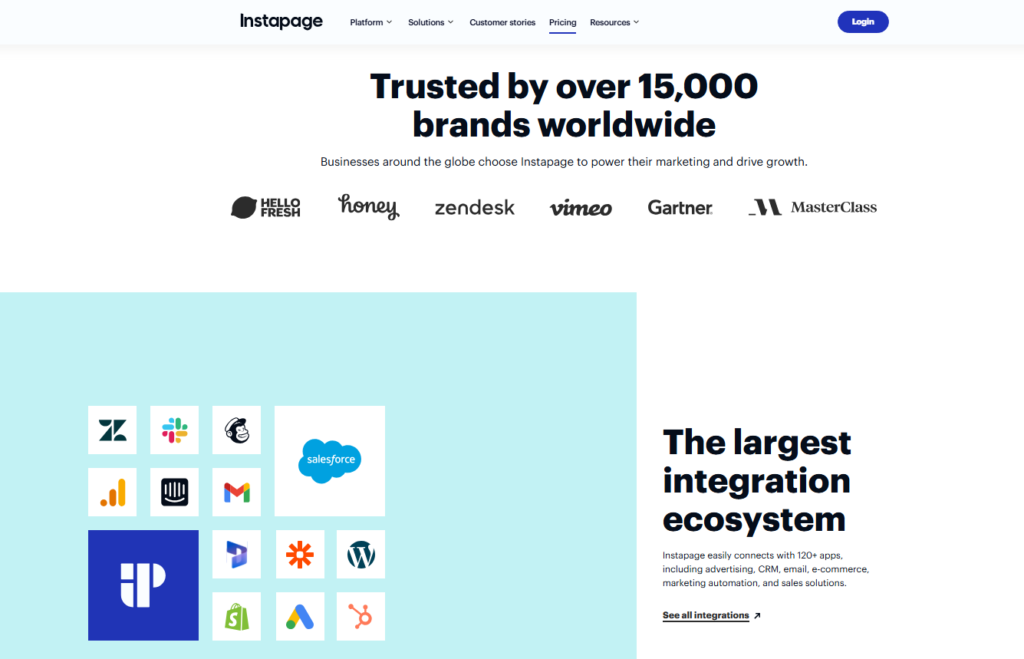
It is aimed at marketing teams, agencies, and solo PPC managers who need fast, high converting pages at scale.
It is not a general website builder. It is a place to build and test pages that your ad spend lands on.
Instapage Pros and Cons
Instapage Pros
- Fluid drag-and-drop builder: you are not locked to a grid, which means total layout freedom
- AdMap feature: visually connects your ads to specific landing pages for better Quality Scores
- Instablocks: save and reuse page sections across multiple campaigns in seconds
- Built in A/B testing: easy to set up, with clean analytics that actually make sense
- AI content generation: writes headlines, CTAs, and body copy directly inside the builder
- Team collaboration tools: leave comments, make edits, and get client approvals inside the platform
- Thor Render Engine: pages load fast, which directly protects your ad conversion rates
- Dynamic text replacement: personalize page copy based on each visitor’s search query
Instapage Cons
- High price point: $99/month is a hard sell for solopreneurs or small budgets
- No built in email marketing on the base plan: you need integrations for full funnel work
- Learning curve on advanced features: AdMap and personalization take time to master
- Limited blogging or SEO capabilities: it is not a website builder, full stop
- Conversion Goals require setup time: tracking isn’t as instant as some competitors
Instapage Pricing and Plans in 2026
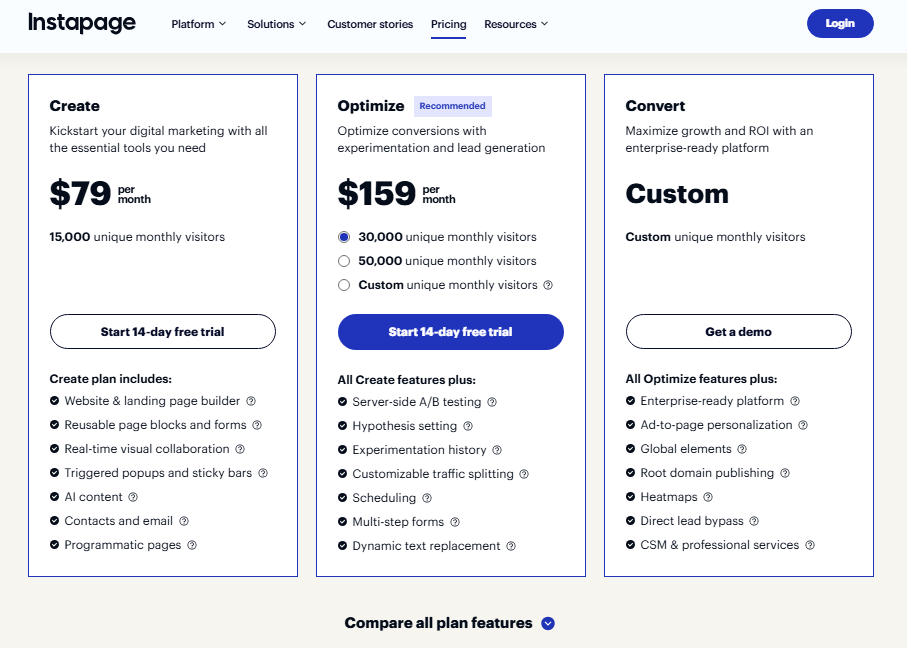
Instapage keeps its pricing straightforward with two main tiers. Here is what you are looking at for 2026:
| Plan | Price (Annual) | Best For |
|---|---|---|
| Create | $79/month | Small teams, solo marketers |
| Optimize | $159/month | Growth teams, AI experiments |
| Convert | Custom pricing | Enterprise teams and agencies |
Is the Price Justified?
Here is the calculation I ran on my own account. If you are running Google Ads at $3,000 per month and Instapage improves your conversion rate by even 1.5%, you are likely recovering your subscription fee in the first week.
The tool pays for itself fast, but only if you are already running real ad spend.
If your monthly ad budget is under $500, the math does not work in your favor. Instapage is built for people who are serious about squeezing every dollar out of paid traffic.
Is There a Free Trial?
Yes. Instapage offers a 14 day free trial with full access to core features. No credit card is needed at signup.
I tested the trial myself and found it gives you enough time to build a real page and run a small test campaign.
Key Instapage Features
Drag-and-Drop Page Builder
What I noticed immediately is that Instapage uses a “pixel perfect” builder. You can place any element anywhere on the canvas, not just inside the pre set columns most page builders force you into.
In my testing, this made a real difference when building complex hero sections or custom CTA layouts.
The builder felt smooth even on pages with lots of elements. I did not experience lag or crashes during my three months of use, which matters more than people admit.
Instablocks for Fast Page Creation
Instablocks are reusable page sections you save once and pull into any page. I used them to save a high performing testimonial section, a trust badge row, and a consistent header.
After that, building a new landing page meant reusing sections that had already proved themselves instead of starting from scratch every time.
Global Blocks take it further: update one block and every page using it updates automatically. For agencies managing 20 plus client pages, this is a genuine time saver.
A/B Testing and Conversion Analytics
Setting up an A/B test inside Instapage took me under four minutes. You duplicate a page, change one element, split traffic, and Instapage handles the rest.
The analytics dashboard shows you visitor counts, conversions, and conversion rates side by side without requiring a statistics degree to interpret.
The analytics also break down performance by device type, which few reviews mention.
I found a significant difference between my mobile and desktop conversion rates that I would have completely missed in a simpler tool.
AdMap for Campaign Personalization
AdMap is the feature that genuinely separates Instapage from most competitors. It lets you build a visual map connecting specific ads to matching landing pages.
You can see which ad points to which page and spot gaps in your campaign structure at a glance.
In my testing with a Google Ads campaign, connecting each ad group to a dedicated, message matched page improved my Quality Score noticeably.
That compounds: better Quality Scores mean lower cost per click across the entire campaign.
Form Builder and Lead Capture
The form builder is solid but not flashy. You get multi step forms, custom fields, conditional logic, and direct integrations with CRMs like HubSpot, Marketo, and Salesforce.
I connected a form to my Mailchimp list in about 90 seconds, and it just worked.
Another overlooked touch: Instapage lets you set a confirmation page inside the form settings rather than forcing you to build a separate thank you page.
Small detail, but it saves setup time.
Ease of Use: Getting Started with Instapage
Template Selection and Customization
Instapage offers 250 plus templates organized by industry and goal: lead generation, webinar signups, product sales, and more.
I found the templates genuinely usable rather than just decorative starting points. Most required only 15-20 minutes of customization before they were campaign ready.
The template quality is a step above what you find in cheaper alternatives. They load fast, look professional on mobile, and are built with conversion elements already in place.
Collaboration Features
If you work with a team or present pages to clients, Instapage’s collaboration layer is one of its strongest selling points.
You can leave comments directly on specific page elements, tag teammates, and track revision history.
I used this during a client review process and it cut approval time in half compared to trading screenshots over email.
Customer Support and Resources
Support Channels and Response Time
Instapage offers live chat, email support, and a knowledge base. In my testing, live chat response times averaged around 4-6 minutes during business hours, which I found genuinely fast.
The support agents understood the product well and gave real answers rather than pointing me to generic help articles.
Help Center and Tutorials
The help center is thorough. Right alongside that, Instapage’s YouTube channel has a strong library of video walkthroughs.
I found video tutorials especially useful for getting up to speed on AdMap, which has a steeper learning curve than the basic builder.
Instapage Alternatives Worth Considering
| Tool | Starting Price | Best For | A/B Testing |
|---|---|---|---|
| Instapage | $99/mo | PPC campaigns, agencies | Yes, built in |
| Unbounce | $99/mo | SaaS, eCommerce | Yes, built in |
| Leadpages | $49/mo | Small businesses, bloggers | Limited |
| Swipe Pages | $39/mo | Budget conscious teams | Yes |
Unbounce is the most direct competitor at the same price point. In my experience, Instapage wins on builder freedom and AdMap functionality.
Unbounce edges ahead on Smart Traffic automation. That difference exists because Instapage was designed specifically around ad to page message matching, while Unbounce has a broader, more general focus.
Who Should Use Instapage: And Who Should Skip It
Instapage is a strong fit for you if:
- You manage PPC campaigns with monthly budgets over $2,000
- You run an agency building pages for multiple clients
- You need AdMap or dynamic text replacement for personalization
- You want built in collaboration without paying for extra tools
You should skip Instapage if:
- You are a beginner just starting your first landing page
- Your ad spend is under $500 per month
- You need a full website with blog functionality
- Your budget is tight and a $99/month commitment feels risky
Instapage gives you every conversion tool you could want in one place.
You only get the return on it if you have live ad campaigns to point at those pages. Without traffic to test, you are paying for capability you never use.
What Most Instapage Reviews Won’t Tell You
Almost no other review mentions this: Instapage’s mobile editing experience has improved dramatically.
Two years ago, mobile layout adjustments were frustrating. Now, mobile specific controls sit directly in the editor and work well enough that I stopped worrying about broken mobile views entirely.
Right alongside that, the AI content generator is more practical than it sounds on paper. I was skeptical going in, but using it to generate five headline variations for a test took about 30 seconds.
Three of the five were genuinely usable, not perfect, but good enough to test fast.
The detail most people miss about conversion analytics is the heatmap integration.
Instapage connects natively with Hotjar and Microsoft Clarity, and I found layering heatmap data with A/B test results gave me a conversion picture that most standalone analytics tools simply cannot match.
FAQ About Instapage
Is Instapage worth the price in 2026?
If you run active paid ad campaigns with budgets over $2,000 per month, yes. The AdMap, A/B testing, and personalization tools can recover the cost quickly through improved conversion rates. For small budgets or beginners, cheaper alternatives like Leadpages or Swipe Pages make more practical sense.
Does Instapage have a free trial?
Yes. Instapage offers a 14 day free trial with access to core builder features, templates, and integrations. No credit card is required to start. It gives you enough time to build a real page and run a test campaign before committing to a paid plan.
How does Instapage compare to Unbounce?
Both tools start at $99 per month. Instapage wins on builder flexibility, AdMap, and team collaboration. Unbounce is stronger on Smart Traffic AI routing. The choice usually comes down to whether you prioritize message matching (Instapage) or automated traffic optimization (Unbounce).
Can I use Instapage for SEO or blogging?
Instapage is not designed for SEO driven content or blogging. It is a conversion focused landing page tool. You can set meta titles and descriptions on pages, but it lacks the blog infrastructure, internal linking tools, and content management features that SEO focused platforms like WordPress provide.
What integrations does Instapage support?
Instapage integrates with major CRMs including HubSpot, Marketo, and Salesforce. It also connects with Google Ads, Facebook Ads, Mailchimp, Zapier, Google Analytics, and more. Most integrations are straightforward to configure directly inside the platform without needing developer help.
Does Instapage work well for agencies?
Yes, agencies are one of Instapage’s strongest use cases. Features like workspaces, team collaboration, Global Blocks, and client sharing make it practical to manage multiple accounts. The Convert plan includes custom sub-accounts and additional permissions specifically designed for agency workflows.
Final Verdict: Is Instapage Worth It in 2026?
Three months of building and testing real campaign pages leaves me here: Instapage earns its premium price tag, but only for the right user.
It is the most conversion focused landing page builder I have used, and the AdMap feature alone has changed how I structure PPC campaigns.
This tool is not for everyone. If you are just starting out or your ad budget is modest, the price will sting without delivering enough extra return.
The platform was built for experienced paid media teams who already know what a high converting page should look like and need the tools to build it fast.
My recommendation rests on the combination of builder freedom, team collaboration, and conversion specific features that no cheaper competitor currently matches at the same depth. If you fit the profile, the 14 day trial is the right first move.