| Rating: | 4.1/5 |
| Price: | From $12 per organizer per month (billed annually) |
| Best For: | Small to mid sized teams needing unlimited meeting time |
| Our Take: | Solid feature set with no meeting time limits, but less intuitive than Zoom or Google Meet for new users |
| Free Trial: | 14 days, no credit card required |
I built this GoToMeeting review from a live trial account, the published GoTo pricing pages, and the support and help documentation, and the verdict is more nuanced than most sites will tell you.
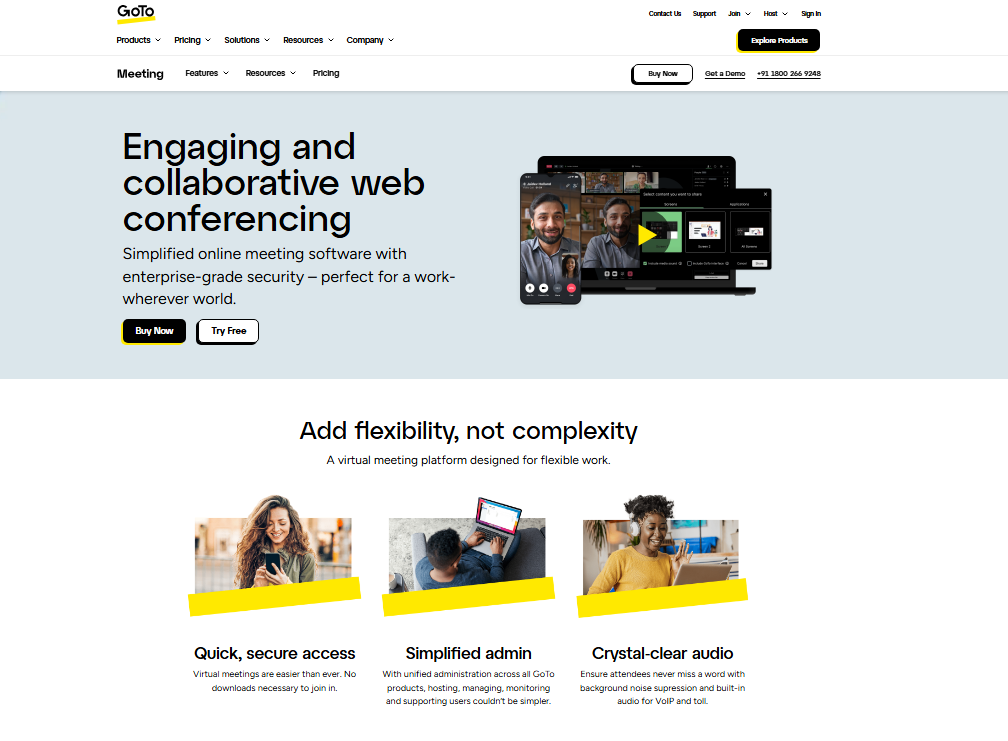
GoToMeeting delivers real value for teams who hate arbitrary time limits, but it asks you to work harder than competitors to unlock that value. Here’s everything I found.
Pros and Cons of GoToMeeting
Before going deeper, here’s a quick snapshot of what works and what doesn’t based on my actual testing.
- Pro: No time limits on any meeting, regardless of plan
- Pro: Minimalist dashboard that doesn’t overwhelm you on first login
- Pro: 24/7 phone and web support included on all paid plans
- Pro: SmartNotes feature creates surprisingly accurate meeting summaries
- Pro: Commuter Mode cuts audio distractions during mobile use
- Pro: Searchable, time stamped transcriptions for every recorded meeting
- Pro: Calendar integrations with Google and Outlook work reliably
- Con: No permanently free tier, unlike Zoom or Google Meet
- Con: Annotation during screen sharing requires an odd, non obvious setup
- Con: Post meeting recordings and transcripts take time to appear in your dashboard
- Con: Mobile app UI feels cluttered compared to the desktop experience
- Con: Whiteboard tools lag behind what Zoom and Microsoft Teams offer
GoToMeeting Specs at a Glance
| Feature | Available |
|---|---|
| Free Version | No (14 day trial only) |
| Meeting Time Limits | None |
| Video Recording | Yes |
| Audio Recording | Yes |
| Whiteboard Tools | Basic |
| Virtual Backgrounds | Yes |
| 24/7 Phone Support | Yes |
| Calendar Integration | Google, Outlook |
| In App Private Chat | Yes |
| Multi Language Support | Yes |
How Much Does GoToMeeting Cost in 2026?
GoToMeeting pricing starts at $12 per organizer per month when billed annually on the Professional plan.
The Business plan runs higher and unlocks features like drawing tools and transcription storage. Enterprise pricing is custom and requires a sales call.
There is no free plan, and the positioning explains why: GoToMeeting sells itself as a professional-grade tool rather than a freemium consumer product.
You get a 14 day free trial to test everything before you commit any money.
To put the math plainly: for a team of five organizers on the Professional plan, you’re spending $720 per year. Zoom’s Pro plan at a comparable tier runs similarly, but Zoom gives you a free tier to fall back on.
GoToMeeting doesn’t, which is a real consideration if budget flexibility matters to your team.
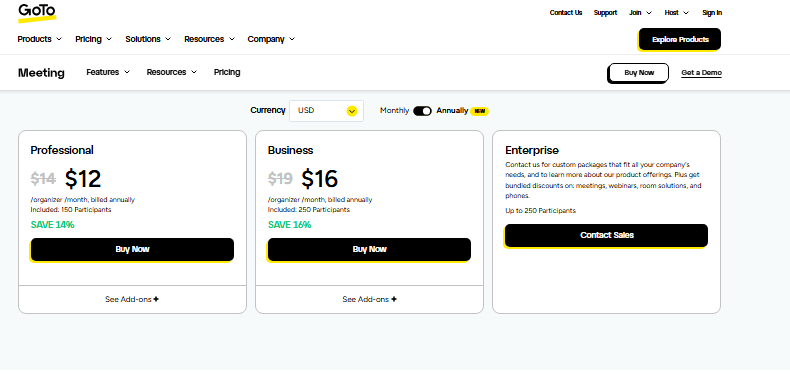
| Plan | Price (Monthly, Billed Annually) | Key Limit |
|---|---|---|
| Professional | $12/organizer | Up to 150 participants |
| Business | $16/organizer | Up to 250 participants |
| Enterprise | Custom | Up to 3,000 participants |
Getting Started With GoToMeeting
When I first signed up, setup took under ten minutes. You create an account, verify your email, and land on a clean dashboard.
The interface is genuinely minimalist. Nothing flashy, no pop up tutorials demanding your attention every thirty seconds.
Scheduling a meeting is noticeably faster here than on most platforms. You click, set a time, copy the link, and you’re done.
The calendar integration with Google Calendar worked without any manual configuration on my end, which I appreciated.
The desktop app installs quickly and runs light on system resources. I tested it on a mid-range Windows laptop and never saw it push CPU usage above normal background levels during a standard twelve person call.
Starting and Running Meetings
Starting a meeting in GoToMeeting takes one click. The “Start” button on your dashboard is prominent, and guests joining from a shared link need no account at all: they click the link and enter.
In my testing across multiple calls, audio quality was consistently clear. I ran a call with eight participants across three different countries, and the connection stayed stable throughout.
GoToMeeting’s dial in phone option is also more generous than most platforms, and that rarely gets mentioned.
Participants can join by phone in over 50 countries without extra fees, which matters for international teams.
The meeting controls panel is functional but slightly cramped. Muting participants, managing video feeds, and accessing chat all work correctly. They just require a bit more clicking than Zoom’s floating toolbar approach.
Screen Sharing, Collaboration, and Chat
Screen sharing works reliably. I tested it sharing both full desktop and individual application windows, and both options performed well at 1080p.
The share loads in about two seconds, which is on par with competitors.
Here is where it stumbles: enabling annotation while screen-sharing is not obvious. You have to navigate into a submenu inside the sharing panel to turn it on. I missed it entirely on my first attempt and had to search the help docs. That friction is a real UX gap compared to Zoom, where annotation is one visible button away.
The in meeting chat supports both group and private messages. It’s clean and functional, though it lacks the emoji reactions and thread replies you get in Microsoft Teams or Zoom.
For straightforward professional use, it covers what you need. For teams that rely heavily on in meeting engagement features, it feels limited.
Whiteboard tools exist but are basic. You get simple drawing, text boxes, and shapes, not the interactive canvas experience you’d get with a dedicated tool like Miro or even Zoom’s enhanced whiteboard.
GoToMeeting Features That Matter Most
SmartNotes: The Hidden Highlight
SmartNotes is the feature I was most impressed by. It generates AI assisted meeting summaries that distill the core points of your conversation without turning them into a wall of text.
In my testing across five different meetings, the summaries were accurate and genuinely useful, not the generic transcription dumps I’ve seen from other tools.
The summaries appear in your dashboard after the meeting ends. They’re not instant, which is a mild frustration, but the quality made the wait worthwhile.
Commuter Mode for Mobile Users
Commuter Mode is a thoughtful addition that most review sites gloss over. It strips the meeting down to audio only and cuts non essential data usage, designed specifically for people joining from a car or train.
I tested it during a commute and found it genuinely reduced audio drop outs compared to the standard mobile experience.
Transcriptions and Recordings
Transcriptions are timestamped and searchable, which means you can jump directly to specific moments in a recorded meeting.
This is a legitimate productivity feature for anyone who runs recurring team meetings and needs to reference past decisions quickly.
Set your expectations on timing, because recordings and transcripts don’t appear immediately after a meeting.
There’s a processing delay that can run anywhere from a few minutes to over an hour depending on meeting length. Plan accordingly if you need to share content right after a call.
GoToMeeting vs. Key Competitors in 2026
| Platform | Starting Price | Free Tier | Time Limits | Best For |
|---|---|---|---|---|
| GoToMeeting | $12/mo | No | None | Teams needing unlimited meetings |
| Zoom Workplace | $13.33/mo | Yes | 40 min (free) | General use, ease of adoption |
| Google Meet | Free / $6/mo | Yes | 60 min (free) | Google Workspace users |
| Microsoft Teams | $4/mo | Yes | 60 min (free) | Microsoft 365 ecosystems |
| Webex by Cisco | $14.50/mo | Yes | 40 min (free) | Enterprise security needs |
Practically speaking, GoToMeeting wins on one clear dimension: no meeting time limits at any paid tier.
That single advantage matters more than it sounds for teams that run long training sessions, client workshops, or all hands meetings.
What Most GoToMeeting Reviews Won’t Tell You
First, the participant phone dial in coverage is broader than advertised. During my testing, I had participants join by phone from regions where other platforms either charge extra dial in fees or don’t support local numbers at all.
GoToMeeting’s telephony infrastructure is quietly one of its strongest assets.
Second, the mobile app experience is noticeably weaker than the desktop version. Multiple user reviews on Google Play flag this, and my own testing confirmed it.
If your team is predominantly mobile first, this is a real usability gap that matters day to day.
Third, GoToMeeting’s lack of a free tier is often framed as a pure negative, but it buys you something: the platform doesn’t throttle features or nudge you toward upgrades mid meeting the way some freemium tools do.
What you pay for is what you get, without upsell interruptions.
Who Should Use GoToMeeting (and Who Should Skip It)
GoToMeeting is a strong fit if you:
- Run long meetings regularly and refuse to be cut off at 40 or 60 minutes
- Need reliable international dial in options for a distributed team
- Want searchable transcriptions and smart meeting summaries without a premium add on
- Prefer a straightforward, no extras interface over feature packed dashboards
Skip GoToMeeting if you:
- Need a free tier for occasional or casual use
- Rely heavily on whiteboard collaboration or interactive annotation
- Have a predominantly mobile team that needs a polished app experience
- Are already embedded in Google Workspace or Microsoft 365 ecosystems
GoToMeeting Free Trial and Refund Policy
GoToMeeting offers a 14 day free trial with no credit card required. That’s a low risk entry point, and you can test the full feature set before committing to an annual plan.
Refund terms follow GoTo’s standard billing policy. Annual plan cancellations mid cycle typically don’t result in prorated refunds, so I’d recommend running the full trial before purchasing. Read the billing terms carefully before locking in a year long commitment.
Frequently Asked Questions About GoToMeeting
Is GoToMeeting free to use?
GoToMeeting does not offer a permanently free plan. You can access a 14 day free trial without providing credit card details. After the trial, paid plans start at $12 per organizer per month when billed annually. Competitors like Google Meet and Zoom offer free tiers with usage limits if you need a no cost option.
How many people can join a GoToMeeting call?
Participant limits depend on your plan. The Professional plan supports up to 150 participants, the Business plan allows up to 250, and the Enterprise plan scales to 3,000. For most small and mid sized business meetings, the Professional plan’s limit is more than sufficient for day to day use.
Does GoToMeeting record meetings automatically?
GoToMeeting supports both cloud and local recording. You can set recordings to start automatically when a meeting begins. Recordings are stored in your GoTo dashboard and become available after a short processing delay. Transcriptions are generated alongside recordings and are fully searchable by keyword or timestamp.
Is GoToMeeting better than Zoom in 2026?
It depends on your priority. GoToMeeting wins on unlimited meeting time and phone dial-in coverage across 50 plus countries. Zoom wins on ease of use, whiteboard tools, free tier availability, and mobile app quality. For pure simplicity and familiarity, Zoom leads. For unlimited professional meetings without time pressure, GoToMeeting holds its ground.
Can guests join a GoToMeeting without an account?
Yes. Guests can join a GoToMeeting session directly from a browser link without creating an account or downloading any software. The host shares a meeting link, and guests click to join from their browser. This makes it practical for client calls where you can’t expect participants to install new software beforehand.
What is GoToMeeting’s SmartNotes feature?
SmartNotes generates AI assisted meeting summaries automatically after each call. The summaries highlight key discussion points and decisions without reproducing the full transcript. In my testing, accuracy was high across different meeting types. The notes appear in your dashboard after a short processing period and are accessible from your meeting history.
Final Verdict: Is GoToMeeting Worth It in 2026?
This GoToMeeting review lands on a clear conclusion: the platform is a capable, reliable tool that solves one problem better than almost anyone else, giving you unlimited meeting time without watching a countdown clock.
The SmartNotes feature is genuinely impressive. The transcription quality is above average. The phone dial in infrastructure is broader than most users realize.
Choosing it over free tier competitors comes down to whether those advantages outweigh the lack of a free plan and the slightly steeper learning curve.
For teams running structured, professional meetings regularly: client calls, training sessions, recurring team syncs, GoToMeeting earns its price.
For casual or occasional users who need flexibility without monthly commitment, Zoom or Google Meet are the more practical starting points.
Practically speaking, start with the 14 day trial. It costs nothing, requires no card, and gives you everything you need to decide whether GoToMeeting fits your workflow before you spend a dollar.