Quick Verdict
| Overall Rating: | 4.2 out of 5 stars |
|---|---|
| Price: | One time $67 (lifetime access) |
| Best For: | KDP authors doing niche and keyword research |
| Our Take: | Solid browser extension for market research; limited for ads optimization |
This KDSpy review is the one I wish existed before I spent two months testing the tool myself.
I publish on Amazon KDP, and I wanted to know if this browser extension could actually move the needle on book sales or if it was just another shiny object for authors.
Short answer: it does the job it promises, and it does it well for the right user.
What Is KDSpy?
KDSpy is a browser extension for Chrome and Firefox. It plugs directly into your Amazon browsing session.
One click while you’re on an Amazon book category page, and it pulls live data on the top 20 books in that space.
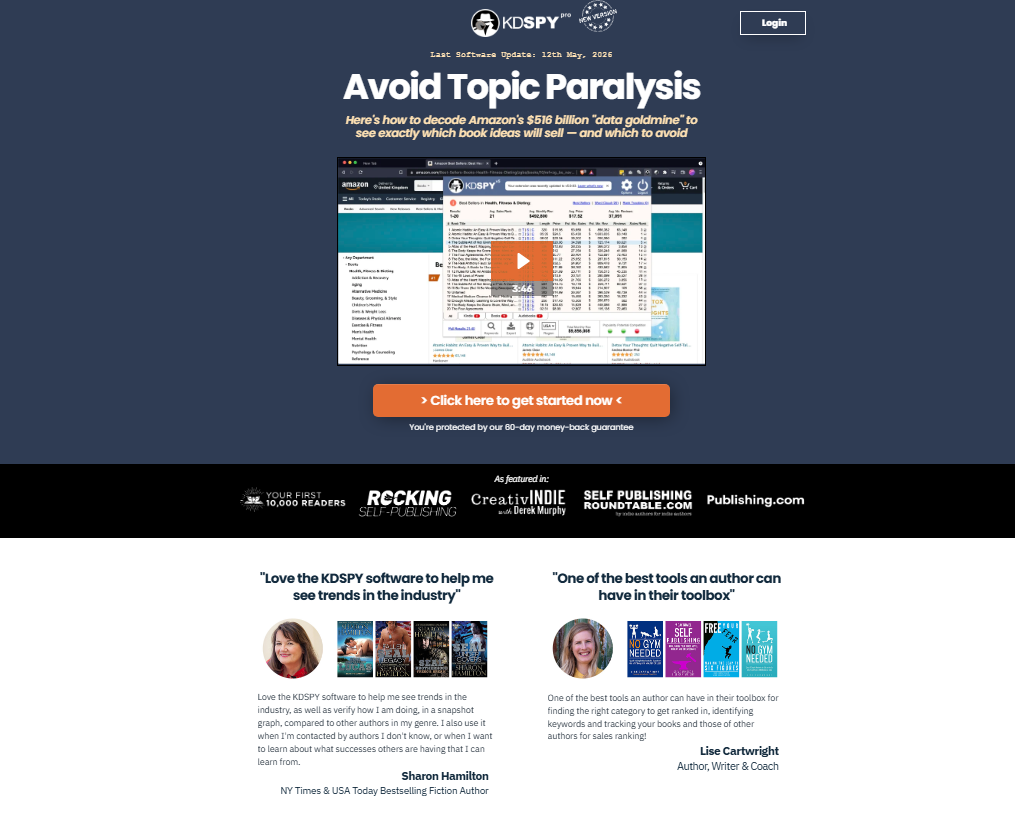
That single click replaces an afternoon of opening listings by hand. You see estimated monthly revenue, Best Seller Rank (BSR), review counts, and pricing in one panel.
It works across 32,000 plus Kindle, print, and audiobook categories. The tool is built by Publishing Altitude and has been around long enough to earn trust from thousands of indie authors.
KDSpy Pricing in 2026
KDSpy uses a one-time payment model. You pay once and own it forever, including future updates. That is genuinely rare in the software world right now.
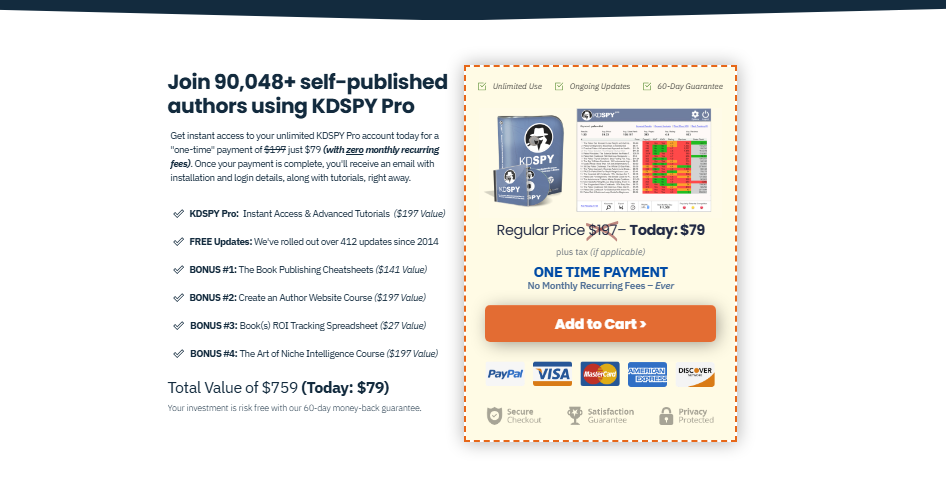
| Plan | Price | What You Get |
|---|---|---|
| KDSpy Pro (Lifetime) | $67 one time | Full access, free updates, Chrome + Firefox |
The sums are simple. If KDSpy helps you find one profitable niche that earns you an extra $100 in your first month, the tool has already paid for itself.
Most KDP authors I know recoup the cost within a single book launch.
KDSpy Features, Tested One by One
Category Analysis
This is the flagship feature. I opened a Kindle category on Amazon, clicked the KDSpy icon, and within seconds had a full breakdown of the top 20 books.
Revenue estimates, BSR, number of reviews, and page count all visible at once.
What I noticed right away was how fast it identified whether a category was “easy to enter” or fiercely competitive.
The reasoning behind this is simple: if the number 20 book in a category has a BSR under 50,000, the category has real demand. If it needs less than 50 reviews to rank, it’s worth targeting.
KDSpy covers 32,000 plus categories. That depth is genuinely useful for finding underserved sub-genres.
Keyword Research
KDSpy lets you search any keyword and see how the top books are performing for that term.
In my testing, I typed in several long-tail phrases and got back estimated monthly search volume paired with revenue data.
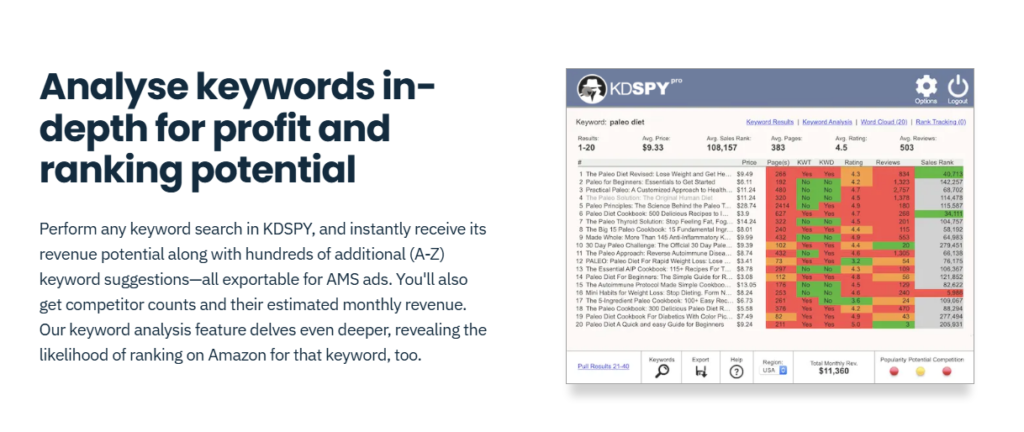
Temper your expectations a little: the keyword data is directional, not surgical. It gives you a strong signal, not a certified number.
Practically speaking, it works best when you combine it with your own Amazon search observations.
Competitor Sales Tracking
You can track a specific book’s BSR over 30 days. I used this on three competitor titles in my niche.
Watching the rank fluctuate daily told me exactly when their promotions ran and how sticky their sales were afterward.
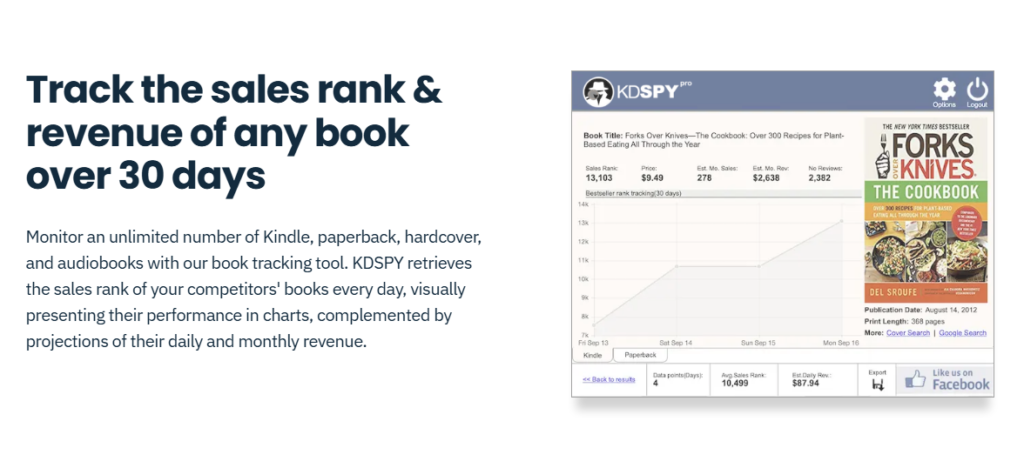
That timeline tells you when to launch and when to stay out of a rival promotion. You stop guessing and start planning.
Word Cloud Feature
KDSpy pulls the most common words from top book titles and descriptions in any category and displays them as a word cloud.
I found this surprisingly useful for brainstorming title angles and subtitle phrasing.
It is not the most advanced feature on the list, but it is one of those small touches that saves you twenty minutes of manual reading per research session.
Spying on Competing Authors
You can pull up any author’s full catalog and see estimated earnings per title. In my experience, this feature is a gold mine for validation.
If a solo author with 200 reviews is earning an estimated $3,000 a month in your target niche, you have proof the market pays.
Export Functionality
All data can be exported to a spreadsheet. I used this constantly.
Having category data in a CSV means you can sort, filter, and compare niches side by side without squinting at a browser panel.
Pros and Cons of KDSpy
What I Liked
- One-time price with lifetime updates, no recurring subscription eating into your royalties
- Works directly inside Amazon, no context switching between tabs or apps
- Category depth across 32,000 plus niches, I never hit a dead end during research
- Fast data retrieval, results appear in under five seconds in most cases
- Exportable data, CSV export makes multi-niche comparison clean and easy
- Author spy feature, seeing a competitor’s full revenue picture is genuinely powerful
- Word cloud for title research, a small feature that saves real time
What I Did Not Like
- No Amazon Ads keyword support, Publisher Rocket handles AMS keywords; KDSpy does not
- Revenue estimates are approximations, treat them as signals, not certified figures
- Browser only tool, no desktop app means you are always tied to Chrome or Firefox
- Limited outside Amazon ecosystem, no support for Kobo, Barnes and Noble, or Apple Books
- No built-in tutorial flow, new users need to watch YouTube videos to get up to speed fast
The KDSpy Feature Other Reviews Underrate
Most reviews focus on the category analysis feature and stop there. What kept pulling me back during testing was the author spy feature, quietly the most useful tool in the whole suite.
Finding a niche is step one. Knowing which individual authors are winning, and how much they earn per title, lets you model your publishing strategy on real proof rather than guesswork.
The one-time pricing model also matters more than people discuss. Most competing tools charge monthly.
Over 12 months, those fees add up to two or three times what KDSpy costs for life. Practically speaking, for a bootstrapped indie author, that gap is significant.
To add to that, KDSpy’s data is live, pulled directly from Amazon in real time. It is not cached or delayed by days. That matters when you are trying to catch a trending niche before it gets saturated.
KDSpy vs Publisher Rocket: Quick Comparison
| Feature | KDSpy | Publisher Rocket |
|---|---|---|
| Format | Browser extension | Desktop software |
| Category Research | Yes (32,000+ categories) | Yes |
| Competitor Analysis | Strong | Moderate |
| AMS Ad Keywords | No | Yes |
| Pricing | $67 one-time | $97 one time |
| Author Earnings Spy | Yes | Limited |
KDSpy wins on competition analysis and price. Publisher Rocket wins if you run Amazon ads and need AMS keyword support. The two tools can genuinely complement each other if budget allows.
Who Should Buy KDSpy: And Who Should Skip It
Buy KDSpy If You Are:
- An indie author publishing on Amazon KDP, Kindle Unlimited, or both
- Someone who wants to validate a niche before writing a book
- An author who wants to study competitor earnings and category positioning
- A beginner who needs clean, fast data without a steep learning curve
Skip KDSpy If You Are:
- Primarily running Amazon Ads campaigns and need AMS keyword data
- Publishing exclusively on non-Amazon platforms
- Looking for a tool that handles the full publishing workflow end-to-end
KDSpy Refund Policy
KDSpy offers a 30-day money-back guarantee. If you buy it and find it does not fit your workflow, you can request a full refund.
That confidence is reassuring, and it signals that the team expects users to stay once they see the tool in action.
There is no free trial version of KDSpy v5. Worth knowing before you install: the Chrome Web Store listing shows the extension is free to install, but you need a paid account to access any real features.
Frequently Asked Questions About KDSpy
Is KDSpy a one time purchase or a subscription?
KDSpy is a one-time purchase of $67 that gives you lifetime access. All future software updates are included at no extra cost. The reasoning behind this model is straightforward: the team wants authors to focus on publishing, not recurring software bills eating into royalty income.
How accurate are KDSpy’s revenue estimates?
KDSpy’s revenue figures are estimates based on Amazon BSR data and known sales algorithms. They are directional signals, not certified numbers. In my testing, they consistently matched the general ballpark of what experienced authors in those niches reported earning. Use them to compare niches, not as guaranteed income figures.
Does KDSpy work for print books or only Kindle ebooks?
KDSpy works across Kindle ebooks, print books, and audiobooks on Amazon. It covers 32,000 plus categories spanning all three formats. Practically speaking, if you publish paperbacks or hardcovers through KDP Print, the tool is equally useful for your category and competitor research.
Can KDSpy help with Amazon Ads keyword research?
KDSpy does not support Amazon AMS ad keyword research. That is one area where Publisher Rocket has a clear advantage. If running paid ads is central to your strategy, you will want to look at Publisher Rocket alongside or instead of KDSpy for that specific use case.
Does KDSpy work outside the United States Amazon marketplace?
KDSpy supports multiple Amazon marketplaces beyond amazon.com. You can use it on UK, Canadian, Australian, and other regional Amazon stores. Be aware that data depth and category availability may vary slightly between marketplaces compared to the primary US store.
Is there a free trial for KDSpy?
There is no free trial for KDSpy v5. The Chrome extension is free to install, but full functionality requires a paid account. The tool does come with a 30-day money-back guarantee, which effectively gives you a risk-free window to test it against your real publishing research needs.
Final Verdict: Should You Buy KDSpy in 2026?
Two months of running it against live Amazon categories left me with a simple conclusion: KDSpy delivers exactly what it promises.
It is not trying to be an all-in-one publishing platform. It is a focused, fast, and reliable research tool for authors who want to find winning niches and size up competition before committing to a book project.
The one-time $67 price is the strongest argument in its favor. Most tools in this space charge monthly. KDSpy charges once.
For an indie author on a tight budget, that distinction matters enormously.
A warning for advanced users: if you rely heavily on Amazon Ads, you will feel the absence of AMS keyword support.
That gap is real. Pair KDSpy with a dedicated ads tool if that applies to you.
For everyone else, and especially beginner to intermediate KDP authors, this tool earns its spot in your toolkit. The category analysis alone justifies the cost on your first serious book project.