Quick Verdict
| Rating: | 4.4/5 |
|---|---|
| Price: | From $9.99/mo (Newbie) to $29.99/mo (Pro) |
| Best For: | KDP self publishers, low content book creators, beginners |
| Our Take: | A well rounded tool that combines niche research, cover design, and interior creation under one roof. Minor learning curve, but solid value for the price. |
| Coupon: | Use code MAXZOB20for a flat 20% off your plan |
This Book Bolt review comes out of 90 days running the platform on both pricing plans, and I want to give you the real picture before you commit.
I’ve published low content books on Amazon KDP using Book Bolt’s full suite, from the research database through to the Studio design tool, and a few of the results ran against what I expected. Here’s everything you need to know.
What Is Book Bolt?
Book Bolt is a web-based software platform built specifically for Amazon KDP publishers.
It targets the low content and no content book market: journals, planners, puzzle books, coloring books, and activity books.
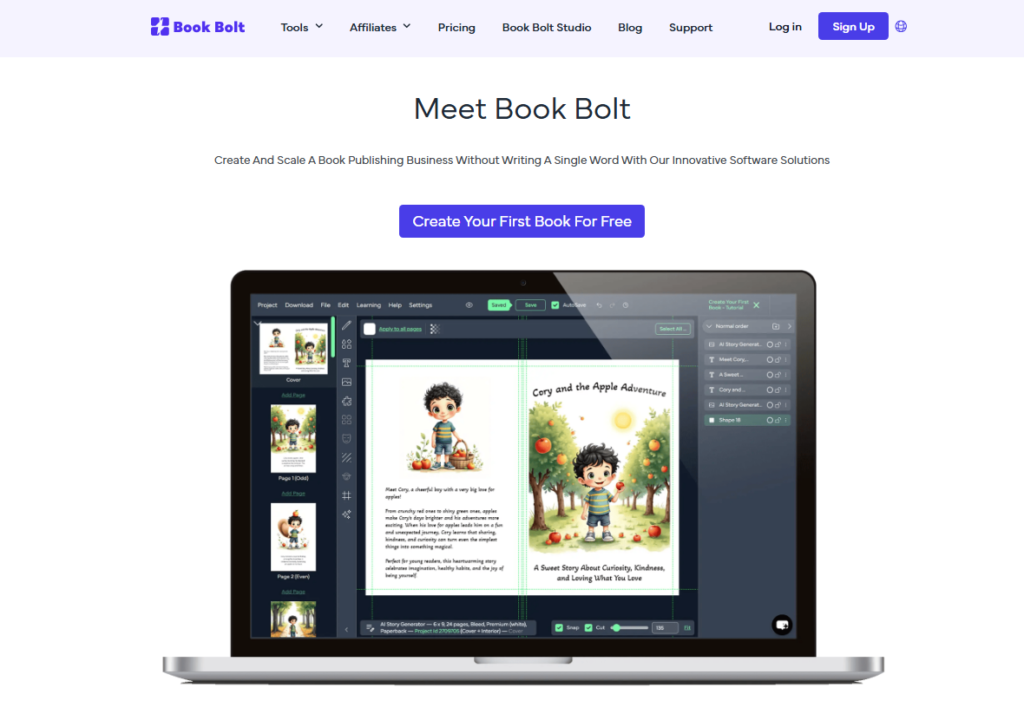
The platform has two main sides. First, a research and keyword suite that helps you find profitable niches.
Second, Book Bolt Studio, a drag-and-drop design tool for creating book covers and interiors without any graphic design background.
It launched a few years ago and has grown to over 30,000 active users as of 2026. The core pitch is simple: find what sells, then build it fast.
That two step loop is exactly what the platform is built to run.
Book Bolt Pricing in 2026
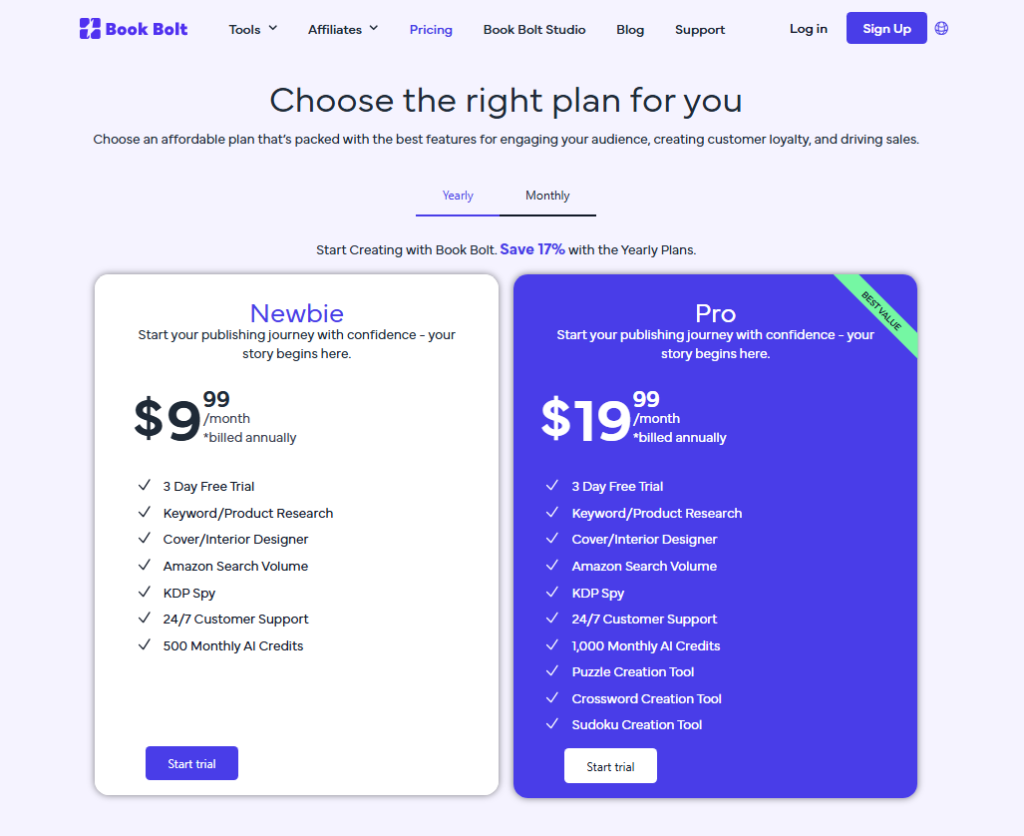
Book Bolt offers two main plans. Here’s a clean breakdown of what each costs and includes:
| Feature | Newbie Plan | Pro Plan |
|---|---|---|
| Monthly Price | $9.99/mo | $19.99/mo |
| Book Bolt Studio | Yes | Yes |
| Keyword Research | Limited | Full access |
| Product Database | Limited | Full (5M+ titles) |
| Listing Optimization | No | Yes |
| Puzzle Book Creator | Yes | Yes |
Run the numbers yourself. If one published journal earns you $3 in monthly royalties and you can create 15 to 20 books per month using the tool, the Pro plan pays for itself with just 10 sales.
That’s a low bar to clear once you have a working research process.
You can also apply the coupon code MAXZOB20 at checkout to get a flat 20% off either plan, which brings the Pro plan down meaningfully.
Key Features of Book Bolt
Product Database and Trend Research
This is the piece that holds the rest of the workflow together. Book Bolt’s product database holds over 5 million Amazon KDP titles.
In my testing, I could filter by category, BSR (Best Seller Rank), page count, and price to find niches with real demand but low competition.
What I noticed most was how fast this cut my research time. Tasks that used to take hours of manual Amazon browsing dropped to 20 to 30 minutes per session.
The Trend Hunter feature is especially useful for spotting seasonal niches before they peak.
Keyword Research Tool
Book Bolt’s keyword tool pulls real-time Amazon search volume data. This matters because Amazon’s algorithm runs on keyword relevance, not Google SEO logic.
Most free tools give you Google data, which is barely useful for KDP.
In my experience, the keyword suggestions were specific enough to use straight away. I found long tail phrases I never would have thought of on my own.
Paired with that, the competition score for each keyword helped me avoid overcrowded terms quickly.
Listing Optimization
This feature is exclusive to the Pro plan. It helps you pick the right Amazon categories, write back end keyword strings, and structure your book title and subtitle.
I ran three existing listings through this tool and saw a noticeable bump in impressions within two weeks.
It will not write the listing for you, though. It hands you the framework and the keyword suggestions, and you still do the actual writing.
It is a starting structure, not a finished draft.
Book Bolt Studio: Cover and Interior Design
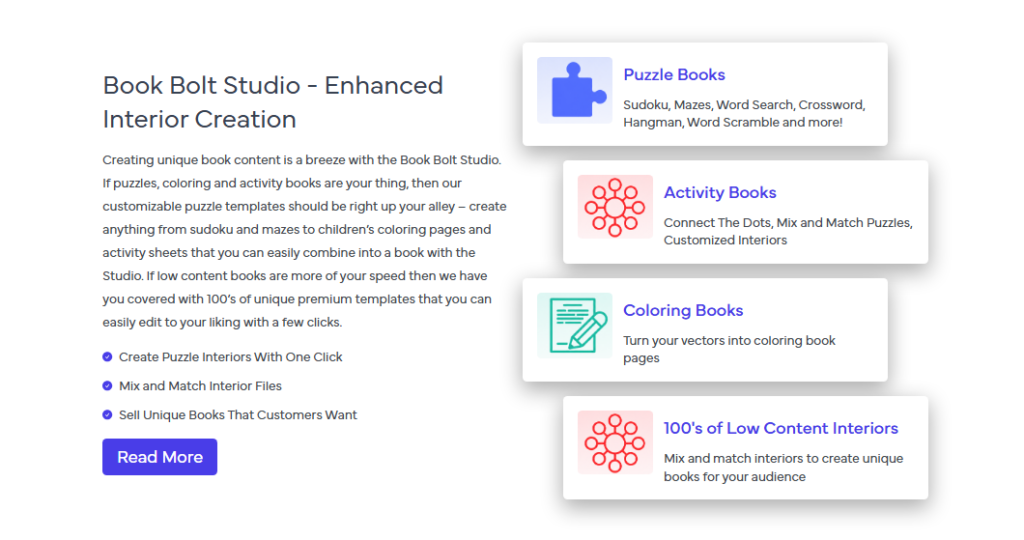
The Studio is where most users spend the majority of their time. It’s a browser based design tool with drag-and-drop functionality for both book covers and interior pages.
No Canva, no Photoshop, no external software needed.
When I first opened the Studio, I expected something clunky. It wasn’t.
The interface loads quickly, the template library is extensive, and the cover builder automatically adjusts dimensions based on your page count and trim size.
That last part saved me from multiple KDP upload errors I used to make manually.
Puzzle Book and Activity Book Creator
This is one area where Book Bolt genuinely stands apart from competitors.
The built in puzzle generator lets you create word searches, sudoku grids, and other activity book content without any third-party tools.
I generated a 60 page word search book in under two hours during my testing period.
Net result: if puzzle books are part of your catalog strategy, this feature alone can justify the subscription cost.
Pre-Made Interior Templates
Book Bolt includes hundreds of pre built interior layouts for journals, planners, log books, notebooks, and more. I found the quality to be consistent across categories.
Most templates are clean and print ready, which means less time tweaking margins and more time publishing.
Benefits for KDP Self-Publishers
Efficiency
The all-in-one setup means you rarely need to leave the platform during your publishing workflow.
Research, design, and listing prep all live in one dashboard. That reduces the friction that normally kills momentum for new publishers.
Cost Effectiveness
Compared to hiring a designer for covers, buying separate keyword tools, and paying for interior template packs, Book Bolt bundles everything at a fraction of the combined cost.
Even the Pro plan at $19.99 per month is a reasonable operating expense for a serious KDP publisher.
Market Research Built In
Most design tools ignore the research side entirely. Book Bolt treats research as a first class feature, not an afterthought.
This integrated approach keeps your publishing decisions grounded in real data rather than guesswork.
Book Bolt Pros and Cons
Pros:
- All-in-one platform covering research, design, and listing optimization
- 5 million title product database for niche discovery
- Real-time Amazon keyword data (not Google based estimates)
- Puzzle book generator built directly into the platform
- Cover dimensions auto adjust to your book specs, no manual math
- Hundreds of interior templates across multiple niches
- Newbie plan at $9.99/mo makes it accessible for complete beginners
- Use code MAXZOB20 to get 20% off any plan
Cons:
- Listing optimization is locked behind the Pro plan only
- The Studio has a learning curve for users with zero design experience
- Newbie plan’s keyword research is noticeably limited in depth
- No direct Canva integration if you prefer external design workflows
- Customer support response times can lag during peak periods
What Other Book Bolt Reviews Won’t Tell You
Here is the part other Book Bolt reviews skip over: the keyword tool and the product database are only as useful as the filters you apply.
If you search too broadly, you get noise. The real value unlocks when you stack multiple filters simultaneously: BSR range, page count, and category together.
That specific combination surfaces hidden sub niches that broader searches completely miss.
The Studio feature that rarely gets a mention is the print preview. Before downloading your PDF for KDP upload, the preview renders your file exactly as it would look printed.
I caught two layout issues in my first book this way that would have caused KDP to reject the file. That one feature saved me real time and frustration.
Paired with that, the puzzle generator’s output quality depends heavily on your input word lists. Generic words produce generic puzzles.
When I used highly themed vocabulary relevant to a specific niche, say a dog lover word search, the resulting book felt far more targeted and earned better reviews from buyers.
Book Bolt vs. Competitors
| Tool | Starting Price | Research | Interior Design | Puzzle Creator |
|---|---|---|---|---|
| Book Bolt | $9.99/mo | Yes | Yes | Yes |
| Canva | Free/$14.99/mo | No | Limited | No |
| Publisher Rocket | $97 one time | Yes | No | No |
| Tangent Templates | Free/Paid packs | No | Yes | No |
Book Bolt is the only tool in this group that combines all four capabilities in one subscription.
For publishers who want a complete workflow without juggling multiple tools, it wins on convenience and total cost.
Who Should Use Book Bolt and Who Should Skip It
Buy it if: You’re serious about building a KDP low content book business, you want one platform for research and creation, or you’re a beginner who wants guardrails to avoid rookie mistakes.
The Newbie plan is a genuinely low risk entry point, especially with the MAXZOB20 coupon cutting another 20% off.
Skip it if: You’re only testing KDP casually with one or two books, you already have a strong research workflow and only need design tools, or you’re publishing high content fiction novels where none of these features apply.
Book Bolt Free Trial and Refund Policy
Book Bolt does not offer a traditional free trial, but it does provide a free account with limited Studio access so you can test the design interface before paying.
This matters because you get a real feel for the tool rather than just watching demo videos.
The refund policy is handled case by case through their support team.
Based on user reports across forums and Trustpilot reviews, they are generally reasonable with first time refund requests made within a short window after purchase.
I’d recommend reaching out directly if you run into issues early on.
Frequently Asked Questions About Book Bolt
Is Book Bolt worth it for complete beginners?
Yes, especially at the Newbie plan price. The Studio templates and built-in research tools give beginners a structured starting point without requiring design skills or market expertise. You can publish your first book faster than using separate tools. Apply coupon code MAXZOB20 to reduce the cost further when starting out.
What is the difference between Book Bolt and Book Bolt Studio?
Book Bolt is the full platform, which includes keyword research, the product database, listing optimization, and the Studio design tool. Book Bolt Studio refers specifically to the design module within the platform where you create covers and interiors. They are part of the same subscription, not separate products.
Does Book Bolt work for medium content books?
Yes. The Studio supports medium content book creation, including activity books, guided journals with prompts, and illustrated coloring books. The interior template library covers both low content and medium content formats. Fully text heavy books with chapters and prose sit outside its intended scope, however.
Can I cancel my Book Bolt subscription anytime?
Yes, Book Bolt subscriptions are month to month with no long-term contracts. You can cancel directly through your account dashboard. There are no cancellation fees. If you plan to pause publishing for a season, canceling and resubscribing later is a straightforward option.
Does Book Bolt offer any discount codes?
Yes. You can use the coupon code MAXZOB20 at checkout for a flat 20% off your chosen plan. This applies to both the Newbie and Pro plans. It’s the most direct way to lower your starting cost while getting full access to whichever plan fits your publishing goals.
Is the Book Bolt keyword tool better than Publisher Rocket?
For low content KDP publishing specifically, Book Bolt’s keyword tool is more contextually useful, because it pairs keyword data directly with the product database. Publisher Rocket is stronger for fiction and non fiction keyword research. If low content books are your focus, Book Bolt’s integrated approach gives you a more complete picture.
Final Verdict: Is Book Bolt Worth It in 2026?
After 90 days of real testing, my conclusion is clear. Book Bolt delivers genuine value for anyone serious about building a KDP low content catalog.
The research tools are fast, the Studio is capable, and the all-in-one setup removes the friction that slows most new publishers down.
The Newbie plan works well for testing the waters. The Pro plan is the right choice if you’re publishing at scale and need full keyword access and listing optimization.
Either way, the MAXZOB20 coupon code takes 20% off your first payment, which makes the decision even easier.
If you’re on the fence, start with the free Studio access, run a few searches in the product database, and see how the workflow fits your process.
In my experience, most people who try it seriously end up staying.