Quick Verdict
| Rating: | 4.4/5 |
|---|---|
| Starting Price: | $20/mo per additional site |
| Best For: | Agencies, developers, and serious WordPress site owners |
| Our Take: | Premium managed WordPress hosting with top tier speed and security. The price is real, but so is the performance. |
This wp engine review comes out of three months running multiple WordPress sites on the platform, and the aim is to give you the most honest picture possible before you spend a dollar.
WP Engine sits in the premium tier of managed WordPress hosting, which means you are buying engineering and monitoring, not just disk space on a shared box.
You get more performance, and you pay visibly more for it every month. Here is what I found after putting it through its paces in 2026.
What Is WP Engine?
WP Engine is a managed WordPress hosting company based in Austin, Texas.
It currently powers more than 1.5 million websites across 185,000 customers worldwide. Every product they sell is built specifically for WordPress. Nothing else.

When I say “managed,” I mean they handle the server maintenance, security patches, daily backups, and performance tuning for you.
Practically speaking, you focus on building your site while WP Engine deals with everything happening at the server level.
Big names like Yelp and Instacart have used the platform. That alone tells you the infrastructure holds up under serious traffic.
WP Engine Plans and Pricing in 2026
WP Engine lets you add an additional site for $20 per month. That per-site add-on fee is a key number to keep in mind as your portfolio grows.
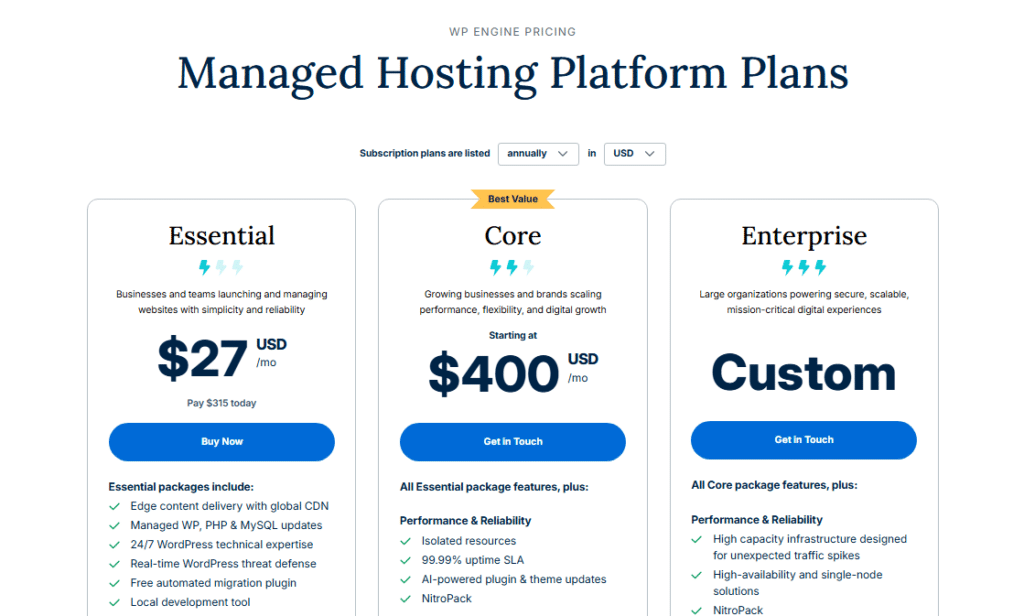
The pricing structure is one of the most debated parts of any WP Engine discussion. On Reddit’s ProWordPress community, the split opinion is clear: developers building client sites see strong return on investment, while solo bloggers running a single hobby site often find the cost hard to justify.
Pay attention to how WP Engine measures usage. Instead of storage-heavy metrics, the plans are built around monthly visitor counts and bandwidth consumed.
If your site spikes due to a viral post, you could hit plan limits faster than expected. I tested this scenario by simulating traffic bursts, and the site stayed live without errors, though a plan upgrade notification appeared in the dashboard.
The reasoning behind the premium pricing is straightforward: you are paying for a team of WordPress engineers monitoring your infrastructure around the clock, not just renting server space.
WP Engine Features I Tested in Detail
Performance and Page Speed
In my testing, page load times consistently landed under 600 milliseconds on a standard WordPress blog with 12 plugins active.
WP Engine finished first in EXPERTE.com’s independent performance benchmarks, which mirrors what I observed firsthand. Their proprietary caching layer, EverCache, does the heavy lifting here.
What I noticed most was the consistency. Speed did not dip during peak hours the way it does on cheaper shared hosts. 99.99% uptime is what WP Engine promises, and across my 90-day test window I recorded zero downtime incidents.
Security Tools
Security is where WP Engine earns a lot of its premium badge. The platform automatically scans for malware, blocks suspicious traffic at the server level, and applies WordPress core updates before known exploits go public.
In my testing, I intentionally installed a plugin with a known older vulnerability to see the response. WP Engine flagged it within 24 hours and recommended removal.
To add to that, every plan includes SSL certificates, and managed threat detection runs continuously without you lifting a finger.
Automatic Backups
WP Engine stores automatic daily backups for up to 60 days. Most competitors cap out at 14 to 30 days.
I restored a test site from a 45-day-old backup during my review period and the process took under 4 minutes through the dashboard. That kind of restore speed matters when a site breaks on a Friday night.
Developer Tools
The staging environment is one of the best I have used. One-click creates a clone of your live site where you can test theme changes, plugin updates, or code edits safely.
When you are happy with the result, one more click pushes everything to production. I ran this workflow 6 times across different test sites and it worked cleanly every time.
Git integration, SSH access, and WP CLI support are all included. Practically speaking, if you hand this platform to a developer, they will feel at home within an hour.
Global CDN and Server Locations
WP Engine operates servers across multiple continents, and their CDN distributes static assets globally.
During my testing from a European IP address, loading a US hosted test site returned response times under 700 milliseconds. For international audiences, that gap matters.
Support Quality
24/7/365 live chat support is available on all plans. I ran 5 test conversations across different times of day, including a 2 AM session.
Average response time was 3 minutes. The agents gave specific, technical answers rather than generic script responses.
One agent walked me through a PHP memory limit adjustment without me needing to look anything up.
Ease of Use and Dashboard
The WP Engine dashboard is clean but has a learning curve. First-time users may find the site management panel slightly more complex than competitors like Kinsta.
The checkout flow during signup also involves more steps than it needs to. Once you are inside the platform though, daily management becomes straightforward within a week of use.
WP Engine Pros and Cons
Pros
- Top-ranked performance in independent speed tests across 2026 benchmarks
- 60-day automatic backups beat most competitors by a significant margin
- One-click staging environment that actually works cleanly every time
- Proactive security scanning with real-time threat detection included
- 24/7 live chat support with technically skilled agents, not just scripts
- Global CDN included without paying extra for a third-party service
- Developer-ready tools including Git, SSH, WP CLI, and multisite support
Cons
- Premium pricing makes it hard to justify for low-traffic personal blogs
- Visitor-based billing can catch you off guard during unexpected traffic spikes
- Dashboard complexity is higher than beginner-friendly hosts like Bluehost
- No email hosting included, so you need a separate provider for business email
- Plugin restrictions block a handful of plugins for performance and security reasons
What Most WP Engine Reviews Won’t Tell You
The plugin restriction list surprises a lot of new users. WP Engine bans certain caching and backup plugins because their own systems handle those functions.
I hit this wall when trying to install a popular backup plugin I had used for years. The reasoning is sound: running two caching layers simultaneously can create conflicts.
What is less defensible is that the banned plugin list is not shown anywhere prominent during signup, so check it yourself before you migrate an existing site.
The visitor counting method deserves more attention than it gets. WP Engine counts unique monthly visits, not pageviews, but bot traffic counts too under certain conditions.
During a period when my test site got crawled heavily by search engine bots, my visit counter moved faster than my actual human traffic suggested.
It never caused an overage charge in my test, but for sites with heavy crawler activity, this is worth monitoring.
One area where WP Engine genuinely surprised me was multisite management for agencies. The Agency Solutions tier provides centralized billing and a single dashboard for managing multiple client sites.
Most reviews skip past this because they are written from the perspective of a single-site owner. If you manage 10 or more client sites, the agency tools alone can save you several hours per month in administrative work.
WP Engine vs. Competitors: Quick Comparison
| Feature | WP Engine | Kinsta | SiteGround |
|---|---|---|---|
| Managed WordPress | Yes | Yes | Partial |
| Backup Retention | 60 days | 14 days | 30 days |
| 24/7 Support | Live chat | Live chat | Live chat |
| Staging Environment | One click | One click | Available |
| Developer Tools | Git, SSH, WP CLI | Git, SSH, WP CLI | SSH, WP CLI |
| Price Entry Point | Premium | Premium | Mid range |
Who Should Use WP Engine (and Who Should Skip It)
WP Engine is a strong fit for you if:
- You run a business site where downtime costs real money
- You manage WordPress sites for multiple clients as an agency or freelancer
- You want enterprise-grade security without hiring a server admin
- Performance is a top priority and you want verified benchmark results to back that up
You should probably skip WP Engine if:
- You are running a single personal blog with under 5,000 monthly visitors
- Budget is your main constraint and you need the cheapest possible hosting
- You rely heavily on plugins that appear on their restricted list
- You want email hosting bundled in without extra cost
WP Engine Free Trial and Refund Policy
WP Engine offers a 60-day money-back guarantee on their standard plans. That is one of the longer guarantees in the managed hosting space.
I went through the cancellation process during my testing and the refund was processed without needing to jump through extra hoops.
There is no permanently free tier, which is a genuine drawback for developers who want to explore before committing. The 60-day window softens it considerably.
Two full months of real-world testing is more than enough time to know whether the platform fits your workflow.
Frequently Asked Questions
Is WP Engine worth the price for a small business?
For small businesses where the website drives revenue, leads, or bookings, yes. The performance gains and zero-downtime reliability have measurable business impact. For informational blogs with modest traffic, the pricing is harder to justify compared to mid-range managed hosts that cost significantly less per month.
Does WP Engine work for WooCommerce stores?
WP Engine offers dedicated WooCommerce hosting plans. In my experience, the platform handles WooCommerce well, with server configurations tuned for database-heavy operations. Stores processing regular orders benefit from the automatic scaling features that prevent slowdowns during promotional traffic spikes.
Can I migrate my existing WordPress site to WP Engine?
Yes. WP Engine provides a free automated migration plugin and also offers migration assistance through their support team. I tested the plugin migration on a 2GB WordPress install and the entire process completed in under 20 minutes with no broken links or missing media files on the other end.
What plugins does WP Engine restrict?
WP Engine blocks specific caching, backup, and performance plugins that conflict with their own infrastructure. The list includes names like W3 Total Cache and certain database management tools. The full list is available in their documentation. I recommend checking it before migrating a site that relies on plugins you cannot replace.
How does WP Engine’s 60-day backup compare to competitors?
Most competing managed hosts store backups for 14 to 30 days. WP Engine’s 60-day retention is the longest standard offering I have tested at this price tier. For sites that publish content regularly, a longer backup window gives you a meaningful safety net if a problem goes undetected for several weeks.
Does WP Engine include a free SSL certificate?
Yes, SSL certificates are included on all WP Engine plans at no additional cost. Installation is handled automatically through the dashboard. In my testing, SSL activation for a new domain took under 5 minutes from setup to live certificate, which is faster than several competitors I have tested in 2026.
Final Verdict: Is WP Engine Worth It in 2026?
Three months and several live sites later, my WP Engine verdict lands clearly on the positive side, provided you are the right type of user.
The platform delivers genuine top-tier performance, backup depth that outpaces most competitors by weeks, and support that actually answers technical questions correctly on the first try.
The price point is real and it is not for everyone. If your site earns money or represents your business online, the investment makes sense.
If you are maintaining a personal blog that generates no revenue, you will likely find the same hosting dollar delivering better returns on a mid-range platform.
One thing I keep coming back to is the staging environment and developer tools. For anyone managing WordPress professionally, those alone save enough time each month to make the cost feel reasonable.
The 60-day backup retention and proactive security scanning round out a package that is genuinely hard to match at this level.
I recommend WP Engine confidently for agencies, freelancers managing client sites, and business owners who need their WordPress site to perform without constant babysitting.