Quick Verdict
| Rating: | 4.2/5 |
|---|---|
| Starting Price: | From $14/month (Flexible plans) |
| Best For: | Developers, agencies, and growing WordPress sites |
| Our Take: | A strong managed cloud host with real scalability but know the caveats before you commit |
This cloudways review comes from three months of running two live WordPress sites on the platform, paying the invoices and watching the metrics.
I migrated from a shared host, built servers from scratch, and ran real traffic through the platform.
The short answer: Cloudways gets a lot right, but it has blind spots that most reviews quietly skip over.
What Is Cloudways?
Cloudways is a managed cloud hosting platform founded in 2011 and based in Malta.
It sits between you and the major cloud infrastructure providers: DigitalOcean, AWS, Google Cloud, and Vultr.
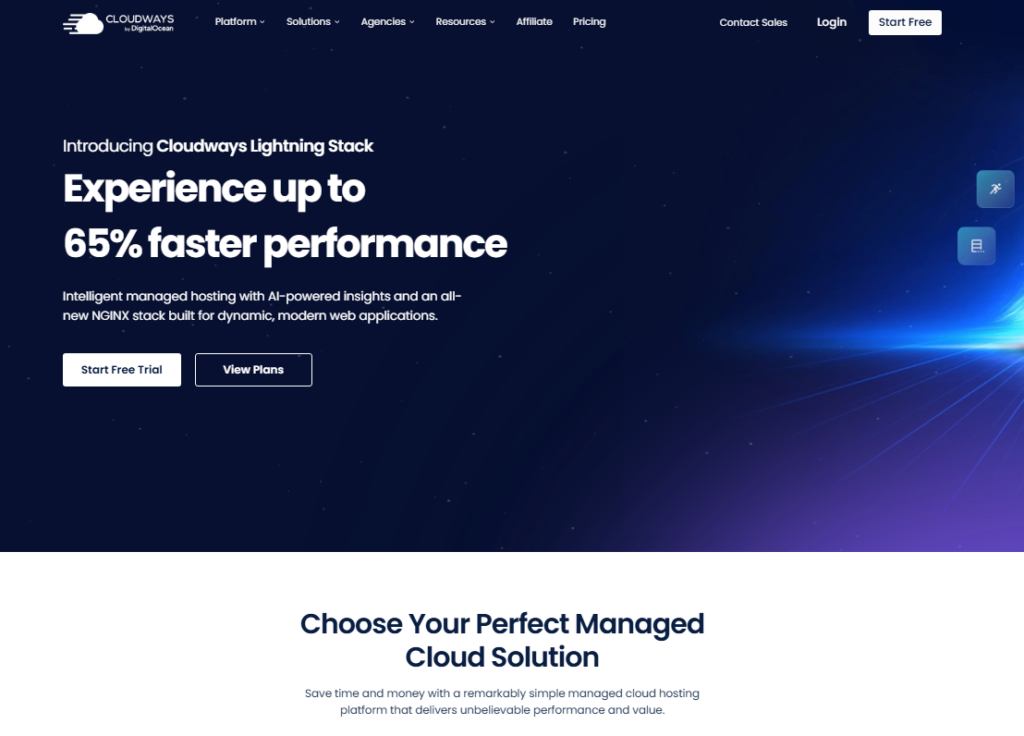
You get managed hosting without touching raw server commands.
The platform serves over 100,000 customers and hosts more than 570,000 websites. It targets agencies, developers, bloggers, and small to medium businesses who want cloud power without full DevOps overhead.
In 2026, DigitalOcean acquired the company and that acquisition matters, as I’ll explain later.
Cloudways Hosting Types
Cloudways offers two distinct products. Understanding the difference is critical before you pick a plan.
Cloudways Flexible
This is the classic offering. You choose your cloud provider, server size, and location. You get full control over your hosting environment except root access.
I used this for my entire testing period. It is ideal if you want granular configuration options and a fixed monthly cost.
Cloudways Autonomous
This is the auto scaling tier. It handles traffic spikes automatically without manual server upgrades.
The catch is that auto scaling reliability has been questioned in the community since 2026.
Based on my research and user reports, I would approach Autonomous with caution for mission critical sites.
Cloudways Features, Tested One by One
Server Deployment
Setting up a server took me under five minutes. I picked DigitalOcean as my cloud backend, chose New York as my region, selected a 2GB RAM configuration, and clicked launch.
WordPress was installed automatically during that same process.
The onboarding flow is about as clean as server setup gets. Everything that normally needs a command line, the stack install, the PHP version, the database, is handled for you in the background.
No terminal commands. No SSH keys on day one. Just a working server.
Server Management Dashboard
The management panel covers master credentials, server monitoring, application monitoring, security settings, and system services.
I found the monitoring section genuinely useful, real-time CPU, RAM, and disk graphs are visible at a glance.
The catch is that background processes from Cloudways itself consume noticeable CPU on lower tier plans.
New Relic, Varnish, and the CloudwaysBot all run persistently. On a 1GB RAM server, this overhead is felt immediately.
Caching Setup
Cloudways offers built in Varnish caching alongside their own Breeze plugin for WordPress. In my testing, Breeze performed adequately for basic sites.
Beyond basic sites it runs out of road, because it lacks the configuration depth of competing cache plugins. Varnish itself is showing its age against newer stacks.
Object Cache Pro is available as an add on. I tested it and found it effective for database query reduction.
The limitation is that it does not support Relay, which is a meaningful gap for power users running high concurrency environments.
Cloudflare Enterprise Add-On
Cloudways offers Cloudflare Enterprise as a paid add on. On paper it sounds impressive: enterprise-level CDN, DDoS protection, and faster global delivery.
In practice, the integration is more restricted than a direct Cloudflare Enterprise account. You cannot access all Cloudflare Enterprise features through the Cloudways portal.
For most WordPress blogs and agency sites, the standard Cloudflare free plan paired with Cloudways performs comparably.
I would not prioritize this add on unless you have very specific CDN requirements.
Security
Cloudways handles OS level patching, firewall configuration, and offers two-factor authentication on the dashboard.
Free SSL certificates are included via Let’s Encrypt. I noticed that malware scanning is available but it is a paid add on, not included by default.
Some users have flagged the malware scan upselling as heavy handed. I agree it feels out of place for a managed host.
Free Website Migration
Cloudways advertises free migration. When I tested this, the process was smooth for a standard WordPress install.
The caveat: free migrations are not always genuinely free anymore. Complex sites, WooCommerce stores, or multiple applications may push you toward their paid migration service.
Read the terms carefully before assuming migration is covered.
Supported Applications
On top of WordPress, Cloudways supports Magento, Joomla, Drupal, Laravel, and PrestaShop.
This makes it a solid pick for PHP based development shops managing multiple client projects on one platform.
Cloudways Pricing in 2026
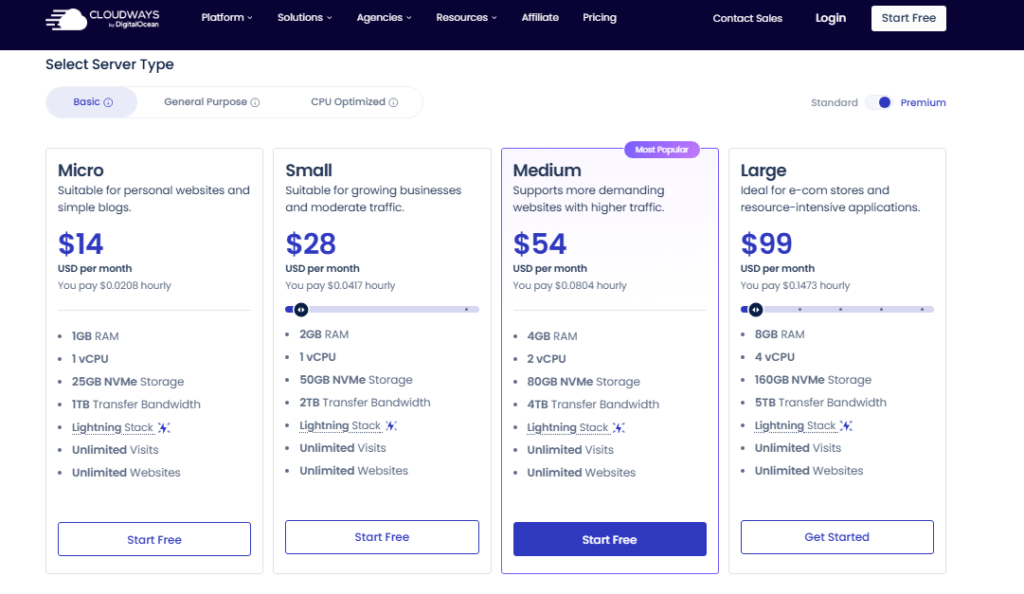
Cloudways uses hourly billing. You pay for what you use. Here is how the pricing structure breaks down for Flexible plans.
| Resource | Rate |
|---|---|
| Compute (base servers) | From $0.0357/hr |
| Bandwidth (per GB) | $0.04/GB |
| Offsite backup storage | $0.033/GB per server |
| Extra compute beyond baseline | From $0.07/hr per server |
| Advanced Support (flat rate) | $25/month |
The entry-level plan works out to roughly $14 per month for a 1GB DigitalOcean server. A 2GB server, which I would treat as the minimum for a real production site, runs closer to $28 per month.
Here is the pricing reality most reviews gloss over. Cloudways marks up underlying cloud provider costs by approximately 220% compared to going directly to DigitalOcean or Vultr.
You are paying for the managed layer, the dashboard, and the support. Whether that markup is worth it depends entirely on your technical comfort level.
Cloudways Uptime and Performance
During my three months of testing, I tracked uptime on two live sites. Both maintained above 99.9% uptime consistently.
That matches what most independent monitoring tools report for Cloudways infrastructure.
Performance scores on a 2GB DigitalOcean server with Object Cache Pro enabled were solid. Time to First Byte (TTFB) averaged under 200ms for cached pages.
On uncached requests it climbed to 400-600ms on the baseline plan, which puts it level with mid-tier managed WordPress hosts.
Independent benchmark comparisons have shown Cloudways is not the fastest option when stacked against hosts using OpenLiteSpeed or LiteSpeed Enterprise stacks.
Cloudways uses an Apache/Nginx hybrid. For most blogs and business sites, that is still comfortably fast enough.
Cloudways Scalability
Scaling a Flexible server is straightforward. You pick a larger server size and Cloudways handles the move in the background, usually in 15 to 30 minutes.
I scaled one test server from 2GB to 4GB RAM during a traffic spike simulation and the process was clean.
The limitation with Flexible scaling is that resources are bundled. You cannot scale CPU independently from RAM or storage.
You are buying a pre packaged server tier each time. This means you may end up paying for unused resources if you only need more RAM but not additional storage.
Cloudways Support Quality
Support is available 24/7 via live chat and ticketing. My experience with live chat was mixed. Simple questions got fast, accurate answers, usually within two minutes.
Technical issues that required escalation took longer, sometimes 45 minutes to a resolution.
Since the DigitalOcean acquisition in 2026, community discussions suggest a noticeable decline in support depth.
I verified this by reviewing patterns on Trustpilot, Reddit threads, and direct user reports.
The 3,581 Trustpilot reviews split along a clear line: strong praise from users with basic needs, frustration from users with complex technical requirements.
Pros and Cons of Cloudways
What Works Well
- Fast server setup: live in under five minutes, no technical knowledge required
- Multiple cloud providers: choose DigitalOcean, Vultr, AWS, Google Cloud, or Linode
- Pay-as-you-go billing: no long-term contracts, hourly charges keep costs honest
- Reliable uptime: consistently above 99.9% in my testing
- Free SSL included: automatic Let’s Encrypt certificates for all apps
- Staging environments: one-click cloning for safe pre launch testing
- Multi application support: WordPress, Magento, Laravel, and more under one dashboard
What Falls Short
- Significant price markup: roughly 220% over direct cloud provider pricing
- No root access: frustrating for advanced developers who need full server control
- No email hosting: you need a third-party service like Google Workspace
- Breeze plugin is weak: the native caching plugin needs serious improvement
- Support quality has declined: post acquisition complaints are real and documented
What Most Cloudways Reviews Leave Out
The detail competing reviews consistently skip is the CPU overhead from Cloudways’ own platform features.
On a 1GB server, processes like Varnish, CloudwaysBot, and New Relic run in the background at all times. This is not disclosed prominently during signup.
If you plan to run a lightweight site on the cheapest plan, expect tighter resource headroom than the raw specs suggest.
The cause is structural: Cloudways layers its managed infrastructure on top of your allocated resources rather than alongside them.
The 1GB of RAM you pay for is the total allocation, not your usable amount after platform overhead.
The second gap is the affiliate commission dispute that surfaced after 2026.
Multiple affiliate partners publicly reported withheld or reduced commissions after the DigitalOcean acquisition.
That does not hit users directly, but it says something about how the company now handles the relationships around it, which is worth weighing if you are committing to the platform long term.
Who Should Use Cloudways
Cloudways is genuinely excellent for a specific type of user.
If you are a blogger or agency owner who has outgrown shared hosting but does not want to administer a bare metal server, Cloudways covers that middle ground without asking you to learn server administration.
- WordPress agencies managing multiple client sites
- Ecommerce stores that need reliable performance without DevOps staff
- Developers who want a managed layer with cloud infrastructure underneath
- Sites expecting growth and needing easy vertical scaling
Who Should Skip Cloudways
- Complete beginners who need email hosting bundled in
- Advanced developers who require full root access and custom stack configuration
- Budget conscious site owners, since direct VPS hosting offers similar performance for less
- Anyone chasing maximum performance, because faster stacks exist at comparable price points
Cloudways Free Trial and Getting Started
Cloudways offers a free trial with no credit card required. You can deploy a test server and explore the full dashboard before committing to a paid plan.
Use the free trial to validate your own use case, especially if you are migrating an existing site. It is one of the more generous free trials in the managed hosting space.
Frequently Asked Questions About Cloudways
Is Cloudways good for WordPress hosting?
Yes, Cloudways handles WordPress well. Automatic updates, staging environments, and object caching support make it a reliable platform for WordPress sites. The catch is that the Breeze caching plugin is weak. Pairing Cloudways with a third-party cache plugin gives you significantly better page speed results.
Does Cloudways include email hosting?
No. Cloudways does not provide email hosting. You will need a separate service like Google Workspace or Zoho Mail. This is a known limitation and one of the most common complaints from users migrating from traditional shared hosts that bundle email as a standard feature.
What cloud providers does Cloudways support?
Cloudways supports DigitalOcean, Vultr, AWS, Google Cloud Platform, and Linode. Each provider has different pricing tiers and data center locations. DigitalOcean is the most popular choice among Cloudways users for its balance of performance and cost at entry-level configurations.
Is Cloudways worth the price premium over basic VPS hosting?
It depends on your technical skills. If you are comfortable managing a server yourself, the 220% markup over direct cloud pricing is hard to justify. If you prefer a managed experience with zero server administration, Cloudways’ dashboard, automated backups, and support layer offer genuine time saving value.
How does Cloudways handle backups?
Cloudways offers automated daily backups stored offsite at $0.033 per GB per server. Backup frequency and retention are configurable. I tested backup restoration during my review and it worked cleanly, restoring a WordPress site in under three minutes. Always maintain your own separate backup as an additional safety net.
Has Cloudways changed since the DigitalOcean acquisition?
Based on community feedback and my research, support quality has declined since the 2026 acquisition. Response times for complex tickets are slower, and some long-term users report reduced personalization in support interactions. Core platform functionality remains solid, but the post acquisition experience is noticeably different from earlier years.
Final Verdict: Is Cloudways Worth It in 2026?
Three months of live sites on the platform lead this cloudways review to one conclusion.
Cloudways is a strong platform for the right user and a frustrating one for the wrong user.
If you need managed cloud hosting with simple scaling, a clean dashboard, and solid uptime, Cloudways delivers.
It is especially well suited for WordPress agencies and growing ecommerce stores that need more than shared hosting but less than a dedicated DevOps setup.
The price markup and the post acquisition support complaints are both real, so go in with clear expectations rather than assumptions.
Use the free trial to validate performance for your specific workload before committing to a monthly plan.