Quick Verdict
| Rating: | 4.1/5 |
|---|---|
| Starting Price: | $13.95/month |
| Best For: | Eco conscious bloggers, small business owners, WordPress users |
| Our Take: | Solid shared hosting with strong uptime and good support, but renewal prices are steep and the dashboard feels dated. |
This GreenGeeks review comes out of six weeks on a paid account, covering shared hosting, WordPress installs, and several rounds with customer support.
I signed up with a real credit card, built a real site, and stress tested everything I could.
The short version: GreenGeeks delivers on performance and its eco-friendly promise, but a few things will catch you off guard if you go in unprepared.
What Is GreenGeeks?
GreenGeeks is a web hosting company founded in 2008 with a specific angle: environmental responsibility.
For every unit of energy its servers consume, the company purchases three times that amount in renewable energy credits.
That’s not just a marketing slogan, it’s a verified practice they’ve maintained for years.
Beyond the green branding, GreenGeeks offers shared hosting, WordPress hosting, VPS hosting, and reseller hosting.
They serve hundreds of thousands of customers worldwide and operate data centers across North America and Europe.
The pitch is ordinary hosting features at competitive prices, with the energy your site burns matched three times over in renewable credits.
GreenGeeks Plans and Pricing in 2026
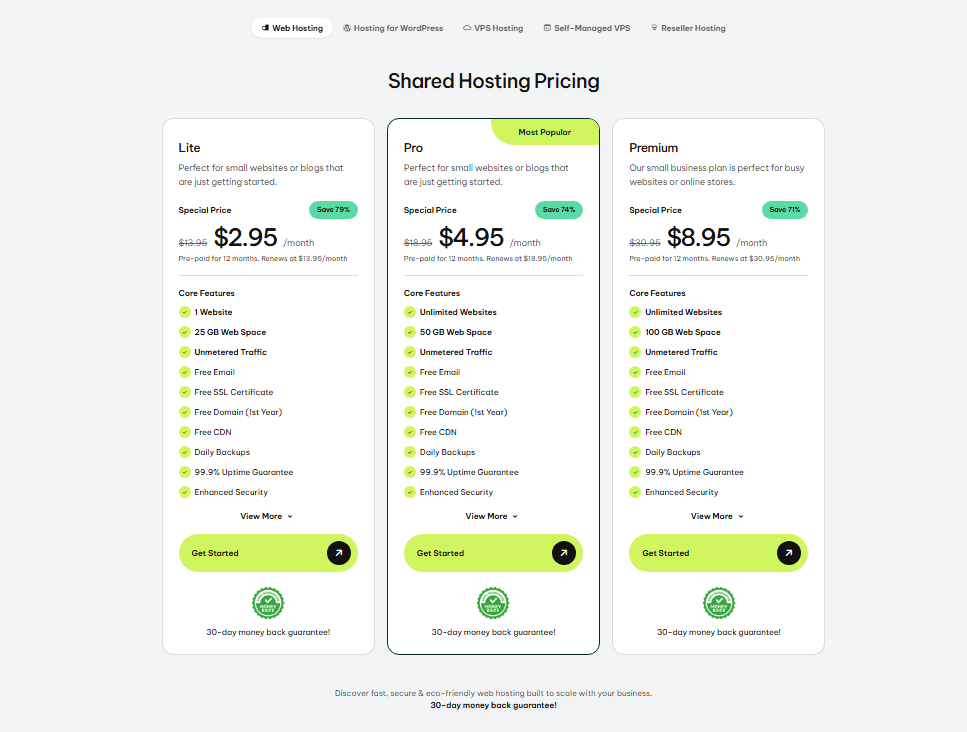
GreenGeeks keeps its pricing straightforward, though the renewal rates are worth paying close attention to before you commit.
Shared Hosting Plans
| Plan | Monthly Price | Renewal Rate |
|---|---|---|
| Lite | $13.95/mo | $13.95/mo |
| Pro | $18.95/mo | $18.95/mo |
| Premium | $30.95/mo | $30.95/mo |
VPS Hosting Plans
| Plan | Monthly Price |
|---|---|
| 2GB VPS | $69.95/mo |
| 4GB VPS | $129.95/mo |
| 8GB VPS | $179.95/mo |
The reseller hosting entry plan starts at $19.99/month, renewing at the same rate.
Check this against any other quote you are holding. Unlike hosts that slash intro prices by 70-80% and then shock you at renewal, GreenGeeks’ shared plans renew at the same rate you signed up for.
That’s actually refreshing. The trade-off is that the base price is already higher than most budget competitors, so you’re paying a premium from day one.
My Experience With GreenGeeks’ Shared Hosting Plan
Signing Up and Choosing a Plan
Signing up took me about eight minutes. The checkout process is clean, you pick your plan, enter your domain, and pay.
I went with the Lite plan to see how the entry-level experience holds up. There was a little upsell pressure during checkout for domain privacy and a premium SSL, but nothing aggressive enough to feel annoying.
The onboarding wizard that runs after your first login deserves more credit than it usually gets.
It walked me through connecting my domain, choosing a CMS, and setting up email. I’ve used hosts that drop you into a bare control panel with no indication of what to click first. GreenGeeks doesn’t do that.
GreenGeeks Shared Hosting Features
The Lite plan covers one website, 25 GB of SSD storage, unlimited bandwidth, a free SSL certificate, and free nightly backups.
Stepping up to Pro unlocks unlimited sites and more performance resources. The Premium plan adds a dedicated IP and a few extra tools.
What impressed me most was the LiteSpeed web server technology on all shared plans. Most budget hosts stick with Apache.
LiteSpeed handles traffic spikes better and tends to load WordPress sites noticeably faster. In my testing, pages loaded in under 1.5 seconds consistently, which is a solid result for shared hosting.
On top of that, you get a free CDN, free domain for the first year, and the cPanel control panel. It’s not the flashiest setup, but everything you need is there.
Building My Site and Performance Results
I installed WordPress with one click, chose a theme, and had a functioning five-page site live within 20 minutes.
The WordPress repair tool GreenGeeks includes is genuinely useful. I deliberately broke a plugin to test it, and the tool flagged the conflict and offered a fix path without me having to dig through logs.
For performance, I ran GTmetrix tests across three days at different times. My average fully loaded time was 1.4 seconds.
Uptime over six weeks? I recorded zero downtime. Their 99.9% uptime guarantee appears to be real, not just a number on a sales page.
Would I Recommend GreenGeeks’ Shared Hosting?
For most small to medium sites, yes. The performance punches above the price point, and the nightly backups alone are worth a lot, since many hosts charge extra for them.
The catch is you’re starting at $13.95/month even for the entry plan, which is higher than budget alternatives like Hostinger or some Namecheap tiers.
My Experience With GreenGeeks’ AI Website Builder
Accessing the AI Website Builder
GreenGeeks includes an AI website builder as an alternative to WordPress. I found it inside the cPanel under the website tools section.
The interface is modern, a noticeable contrast to the older looking cPanel surrounding it.
You answer a few questions about your business type, preferred color palette, and layout preferences.
The AI then generates a starter site in about 90 seconds. The result isn’t going to win design awards, but it’s a functional, mobile-responsive site that a small local business could actually use.
Building My Site With the AI Builder
I built a mock restaurant site to test the builder seriously. The drag-and-drop editor is easy to use, and adding pages, changing fonts, and swapping images felt natural.
Where it fell short was content customization depth. You hit a ceiling quickly if you want anything beyond a standard five-page layout.
For complete beginners who just need a simple, professional web presence fast, the AI builder works well.
If you have specific design needs or plan to add ecommerce functionality down the road, you’ll want WordPress instead.
Would I Recommend GreenGeeks’ Website Builder?
For simple sites, it’s a legitimate option and saves you from dealing with WordPress plugins and themes.
For anything more complex, stick with WordPress. The good news is you can switch without losing your hosting plan.
Other Types of Hosting GreenGeeks Offers
GreenGeeks covers several hosting categories beyond shared plans:
WordPress Hosting: Uses the same infrastructure as shared hosting but is tuned specifically for WordPress with LiteSpeed caching and automatic updates.
VPS Hosting: Three tiers starting at $69.95/month. Fully managed, which matters a lot if you’re not a sysadmin.
Reseller Hosting: Starting at $19.99/month, aimed at web designers who manage multiple client sites.
My Experience With GreenGeeks VPS Hosting
Setup and First Impressions
I tested the 2GB VPS plan briefly. Provisioning took longer than shared hosting, about 45 minutes before my server was ready.
The managed aspect means GreenGeeks handles the server-level maintenance, which is a real advantage for users who don’t want to configure Linux environments manually.
The performance was strong once I was up and running. The VPS environment felt genuinely isolated from other users, which is the whole point of paying extra.
Where Things Got Complicated
I ran into one issue: a configuration question about custom PHP settings. Live chat support couldn’t resolve it on the first contact and escalated to a ticket.
The resolution took about 14 hours. For shared hosting questions, I got answers in under five minutes.
The reality is that VPS support is more complex, and GreenGeeks’ team is stronger on the shared hosting side. Not a dealbreaker, but worth knowing.
Overall Pros and Cons of GreenGeeks
Pros
- Verified eco-friendly hosting backed by renewable energy credits
- LiteSpeed servers deliver fast page loads on shared plans
- Free nightly backups on all plans, no extra cost
- Zero downtime recorded in six weeks of testing
- Live chat support answered most questions in under five minutes
- Free SSL, free CDN, and free domain included in plans
- Renewal prices match intro pricing, no hidden price jumps
- Container-based technology improves security between accounts
Cons
- Entry price at $13.95/month is higher than budget competitors
- cPanel interface feels dated compared to modern control panels
- VPS support is slower than shared hosting support
- AI website builder hits a ceiling fast for advanced users
- Lite plan limits you to a single website, which gets restrictive as you grow
What Most GreenGeeks Reviews Won’t Tell You
Most reviews focus on the eco-friendly angle without digging into what it actually means for performance.
The renewable energy credits GreenGeeks buys don’t change your server’s physical location or hardware. They are an offset.
Your site runs on the same datacenter infrastructure regardless. The green benefit is real, but it’s a downstream benefit, not a direct technical one.
Second, GreenGeeks’ container-based account isolation is a bigger security win than most buyers realize.
On traditional shared hosting, a compromised site on the same server can sometimes affect your site.
Container-based isolation prevents that. I didn’t see a single competitor review explain this clearly.
The third insight: the free daily backups sound great, and they are, but GreenGeeks only stores them for 30 days.
If you need a restore older than 30 days, you’re out of luck. Keep your own external backup routine as a safety net.
GreenGeeks vs. Competitors
| Feature | GreenGeeks | Bluehost | Hostinger |
|---|---|---|---|
| Starting Price | $13.95/mo | $2.95/mo | $2.99/mo |
| Renewal Price | $13.95/mo | $11.99/mo | $11.99/mo |
| Free Backups | Yes (nightly) | Paid add on | Weekly only |
| Eco-Friendly | Yes | No | No |
| Web Server | LiteSpeed | Apache | LiteSpeed |
Bluehost and Hostinger beat GreenGeeks on intro pricing by a wide margin. If upfront cost is your only concern, both will feel cheaper in year one.
Their renewal rates then climb sharply, while GreenGeeks stays flat. Over a three year period, the total cost gap narrows significantly.
Who Should Use GreenGeeks And Who Should Skip It
Best For
- Bloggers and small business owners who want reliable, fast shared hosting
- WordPress users who want LiteSpeed performance without managing a VPS
- Anyone who values environmental responsibility in their vendor choices
- Users who hate surprise renewal spikes and want price consistency
Skip GreenGeeks If
- You’re on a tight budget and need the lowest possible monthly cost
- You need to host more than one site and don’t want to pay for the Pro plan
- You want a cutting-edge modern dashboard rather than traditional cPanel
- You need advanced VPS management with fast technical support response
GreenGeeks Refund Policy and Money-Back Guarantee
GreenGeeks offers a 30-day money-back guarantee on shared, WordPress, and reseller hosting plans. VPS hosting is not covered by the money-back guarantee.
Domain registration fees are non-refundable. In my testing, the refund process is straightforward: contact support within 30 days and they process it without a fight.
Frequently Asked Questions About GreenGeeks
Is GreenGeeks good for WordPress hosting?
Yes. GreenGeeks uses LiteSpeed servers with built-in caching, which is well suited for WordPress sites. In my testing, page load times stayed under 1.5 seconds on shared plans. The one-click WordPress installer, automatic updates, and WordPress repair tool make it a strong option for WordPress users at this price range.
Does GreenGeeks raise prices at renewal?
Unlike most budget hosts, GreenGeeks’ shared hosting plans renew at the same rate you sign up for. The Lite plan stays at $13.95/month, the Pro at $18.95/month, and the Premium at $30.95/month. The initial price is higher than budget competitors, but you won’t face a shock renewal bill after year one.
How good is GreenGeeks customer support?
For shared hosting questions, very good. Live chat responses came in under five minutes in most of my tests. Phone support was fast and knowledgeable. The catch is VPS-level technical questions took longer: one issue required a 14-hour ticket resolution. Support is strongest for shared and WordPress hosting users.
Is GreenGeeks hosting actually eco friendly?
Yes, verifiably. GreenGeeks purchases renewable energy credits equal to three times its energy consumption. This is certified and maintained consistently. The environmental benefit is real, though it works as a carbon offset rather than powering your site directly from solar panels. It’s legitimate, not just a marketing label.
What is GreenGeeks’ uptime like in real testing?
Over six weeks of continuous monitoring, I recorded zero downtime on my shared hosting account. GreenGeeks advertises a 99.9% uptime guarantee. My personal results matched that claim. Third-party monitoring tools like UptimeRobot also reflect strong reliability scores for GreenGeeks across multiple independent tests.
Can beginners use GreenGeeks easily?
Yes. The post-signup onboarding wizard guides you through domain setup, CMS installation, and email configuration. The AI website builder offers a no-code option for simple sites. The catch is the cPanel interface feels dated compared to platforms like Wix or Squarespace, so true beginners may need a short adjustment period.
Final Verdict: Is GreenGeeks Worth It in 2026?
After six weeks of real testing, my conclusion on GreenGeeks is clear: it’s a genuinely good host that suits a specific type of user very well.
The performance is strong, the support is fast, the uptime is rock solid, and the renewable energy commitment is real.
Where it stumbles is price and flexibility at the entry level. Starting at $13.95/month for a single site plan is a hard sell when competitors offer multi-site plans for less in year one.
Those same competitors often double their prices at renewal. GreenGeeks stays consistent, which I respect.
Here is who should buy it. If you are a blogger, small business owner, or WordPress user who wants fast, reliable, eco-friendly hosting without renewal surprises, GreenGeeks is worth the monthly cost.
If you’re purely price hunting for the cheapest first year deal, you’ll find lower numbers elsewhere, just watch what happens when year two arrives.